
This document guides how to use the Kakao SDK for Flutter("Flutter SDK") provided by the Kakao Developers.
- Flutter 3.38.0 or higher
- Dart 3.9.0 or higher
- Target Android API level 21 or higher (Android 5.0 or higher)
- iOS 13.0 or higher
The Flutter SDK supports web browsers below in the mobile and PC web environments, and does not support Internet Explorer (IE).
| Browser | Android | iOS | macOS | Windows | Linux |
|---|---|---|---|---|---|
| Chrome | O | O | O* | O* | O* |
| Edge | O | O | O | O* | O |
| Firefox | O | O | O | O | O |
| Safari | X | O | O | X | X |
Refer to the details below and the Platform key, then register the platform information supported by your service in [App] > [Platform Key] on the app management page.
- Native app only: Register the Native app key (Android, iOS).
- Web only: Register the JavaScript key.
- Both native app and web: Register the Native app key (Android, iOS) and the JavaScript key.
The bundle ID for iOS platform information is on [Target] > [General] > [Bundle Identifier] in Xcode. Open the project in Xcode or [${Project}] > [ios] in Android Studio.
Bundle ID in Android Studio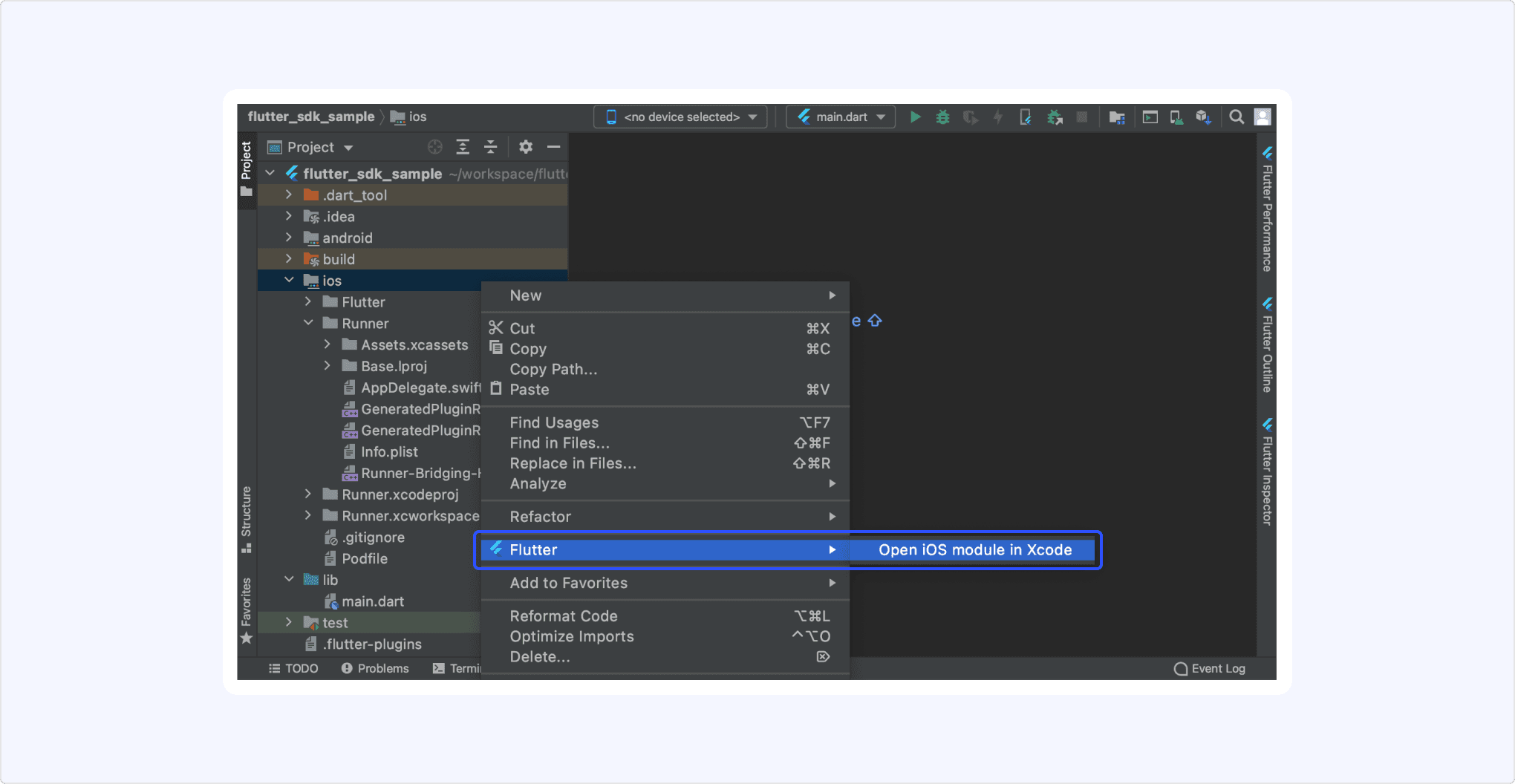
Bundle ID in Xcode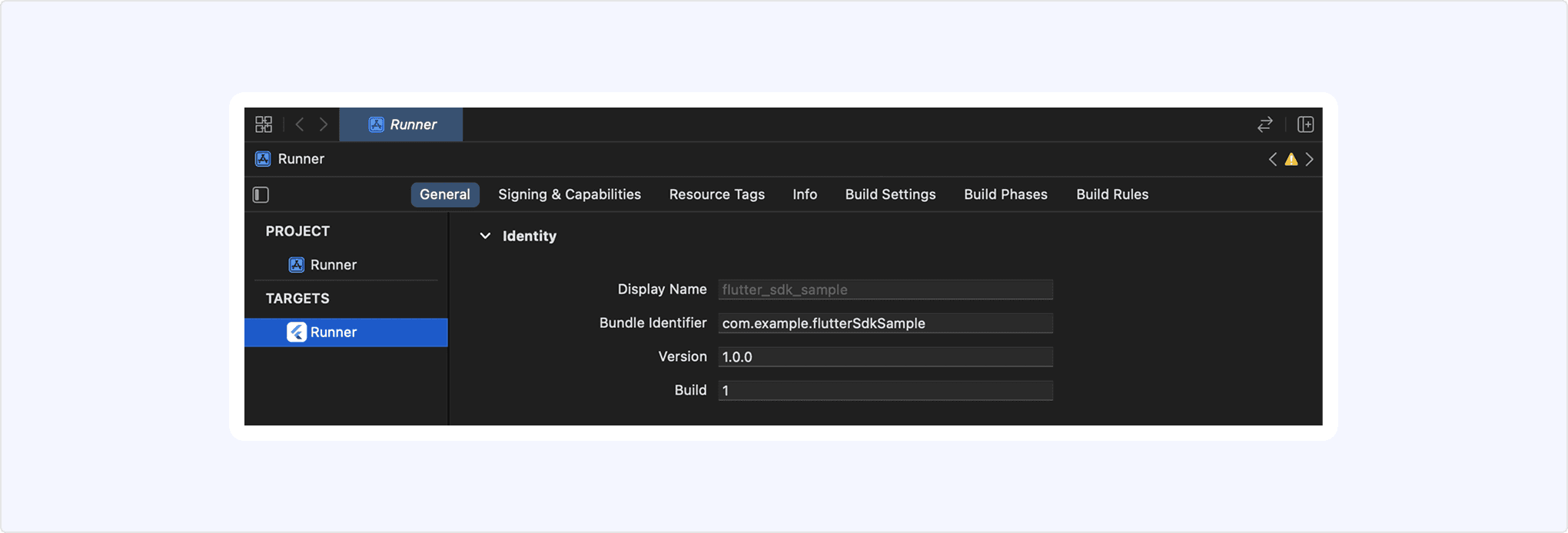
Kakao Developers provides a sample app that enables you to quickly check the key features of the Flutter SDK. With the sample app, you can test SDK features such as Kakao Login and Kakao Talk Share directly and review the implementation example code.
This section describes how to run the Flutter SDK sample app.
- Import the project from the Flutter SDK GitHub repository.
- To run the sample app features in an Android environment, you must register the debug key hash of the imported sample app project in [Android SDK sample app] on the Account settings page. For the details, see Android SDK sample app.
- You can run the sample app to test the key features of the Flutter SDK and review the implementation example code.
To use a custom URL scheme on Android devices, set a custom URL scheme to launch the service app when a user clicks a button or link in the Kakao Talk message or to be returned to the service app when Kakao Login process is done.
After setting up a custom URL scheme, launching the service app using the kakao${YOUR_NATIVE_APP_KEY}://${PRODUCT_NAME} type scheme is available. Input the native app key to ${YOUR_NATIVE_APP_KEY} by referring to [App] > [Platform Key] on the app management page. Input the following host property of product to ${PRODUCT_NAME}.
- Kakao Login:
oauth - Kakao Talk Share, Kakao Talk Message:
kakaolink
Edit AndroidManifest.xml file in Flutter project ${Project} > android > app > src.
- Kakao Login
- Add
<activity>element for setting Redirect URI inside<application>element. See the example below.
- Add
- Kakao Talk Share, Kakao Talk Message
- Inside of
<application>element withandroid:name=".MainActivity"property, add<intent-filter>with<data android:host="${PRODUCT_NAME}" android:scheme="kakao${YOUR_NATIVE_APP_KEY}" />type element. See the example below.
- Inside of
- For the app targeting Android 12 (API 31) or higher, declare
android:exportedand set it totrue.
To use a custom URL scheme on iOS devices, both setting below are required.
- Allowlist
- Open the project in Xcode via [
${Project}] > [ios] and set the allowlist - Setting path: [TARGET] > [Info] > [Custom iOS Target Properties]
- Path of Info.plist file for manual setting: [
${Project}] > [ios] > [Runner] > [Info.plist]
- Open the project in Xcode via [
- URL Schemes
- Open the project in Xcode via [
${Project}] > [ios] and set the URL schemes - Setting path: [TARGET] > [Info] > [URL Types] > [URL Schemes]
- Open the project in Xcode via [
For Kakao Talk Share and Kakao Talk Message, you can get a custom URL scheme by calling the function below regardless of whether the app is running or not.
The function above should be called after initializing the Flutter SDK. See Initialize.
In the case of native apps, additional data can be sent with a custom URL scheme for the service requirement. Set the key and value to androidExecutionParams, iosExecutionParams parameter. See the example below.
To use the Flutter SDK for a web page on a hybrid application ("hybrid app"), develop a WebView as follows to work properly. Required actions are the same as Kakao SDK for JavaScript. Refer to Set up for hybrid app.
To import the Kakao Flutter packages in the project, set dependencies as follows.
Add the dependency for the Flutter SDK in pubspec.yaml. Add desired or all packages.
To add all packages, run the following command in Terminal.
To get the packages, run the following command in Terminal.
Call the init() method in the main() function. Note that the initialization should be done before calling runApp() method.
Platform key are required to initialize. Pass the app keys for the platforms that the service supports.
- Supports native apps only
- Use Native app key to call Kakao APIs
- Pass Native app key with
nativeAppKeyparameter when callinginit()method
- Supports web only
- Use JavaScript key to call Kakao APIs
- Pass JavaScript key with
javaScriptAppKeyparameter when callinginit()method
- Supports both Native apps and web
- Use both JavaScript key and Native app key to call Kakao APIs
- Pass Native app key with
nativeAppKeyparameter, and pass JavaScrip key withjavaScriptAppKeywhen callinginit()method
Refer to the following documents when reading the developer documentation.
- Notation guide: Explains the notation conventions and how to read the parameter and field tables in the documentation.
- Glossary: Explains the terms used in the documentation.
The packages and main features of Flutter SDK are below.
| Packages | Client | Description |
|---|---|---|
kakao_flutter_sdk_common | - | Common package for essential elements Main features: Initialize |
kakao_flutter_sdk_auth | AuthApi | Package for the authentication and token management through Kakao Login Including PrivacyInfo.xcprivacy file for iOS appsMain features: Check token presence API |
kakao_flutter_sdk_user | UserApi | Package for the Kakao Login APIs Main features: Kakao Login API, Retrieve user information API |
kakao_flutter_sdk_share | ShareClient | Package for the Kakao Talk Share APIs Main features: Send message with custom template API |
kakao_flutter_sdk_talk | TalkApi | Package for the Kakao Talk Channel, Kakao Talk Social, Kakao Talk Message APIs Main features: Follow Kakao Talk Channel API |
kakao_flutter_sdk_template | - | Package for message templates |
kakao_flutter_sdk_friend | PickerApi | Package for the picker APIs Main features: Retrieve friends through picker API |
kakao_flutter_sdk_navi | NaviApi | Package for the Kakao Navi APIs |