This document guides how to use the Kakao SDK for Android("Android SDK") provided by the Kakao Developers.
- Android Studio 3.6.1 or higher
- API 23: Android 6.0 (Marshmallow) or higher
The Android SDK uses the following libraries that are automatically installed when installing the Android SDK.
Set the Android app information in [App] > [Platform Key] > [Native app key] on the app management page. For details, see Native app key.
A key hash is a hashed value of the certificate’s certificate fingerprints, used to determine whether an app is malicious. When the Kakao API is invoked, the Kakao API server checks whether the key hash added to the request header matches the value registered on the Kakao platform. There are two types of key hashes: a debug key hash and a release key hash.
- Debug key hash: A value hashed from the debug certificate automatically generated by Android Studio according to the development environment when the project is first created or debugged.
- Release key hash: A value hashed from the release certificate created for distributing the app to an app store.
Check both the debug and release key hash values using the methods below, then register them in [App] > [Platform Key] > [Native app key] on the app management page. For details, see Native app key.
- Add all debug key hashes for each development environment.
- Add the release key hash.
- Kakao API calls will fail if the app does not have the necessary key hashes registered.
- If multiple developers are working on the app, register every developer's debug key hash, as they differ depending on each developer’s environment.
To get key hashes using Terminal, Keytool program, key and certificate management tool are required. On Windows, download OpenSSL for Windows libraries is required. On Mac, Keytool is installed.
Run the command in Command Prompt according to the operating system.
Call the getKeyHash() method provided in Utility through the Android SDK.
With Google Play App Signing, use the SHA-1 certificate fingerprint obtained on the Google Play Console, not generating a Release key hash on the Terminal. Refer to Play Console Help > Use Play App Signing for more details.
In the Google Play Console, select [Release Management] > [App Signing], and then copy the value of SHA-1 certificate fingerprint. Refer to Use Play App Signing.
Run the following command in Terminal with the SHA-1 certificate fingerprint value obtained.
Kakao Developers provides a sample app that allows you to quickly check the main features of the Android SDK. With the sample app, you can directly test SDK features such as Kakao Login and Kakao Talk Share, and review sample implementation code.
This section describes how to run the Android SDK sample app.
- Download the Android SDK sample app from Download.
- Refer to Key hash to generate the debug key hash for the sample app project.
- Register the generated key hash in [Android SDK sample app] on the Account settings page.
- You can run the sample app to test the key features of the Android SDK and review the implementation example code.
Allow internet permission to communicate with the Kakao Sever through the Kakao APIs.
Screenshot of allowing internet permission in Android Studio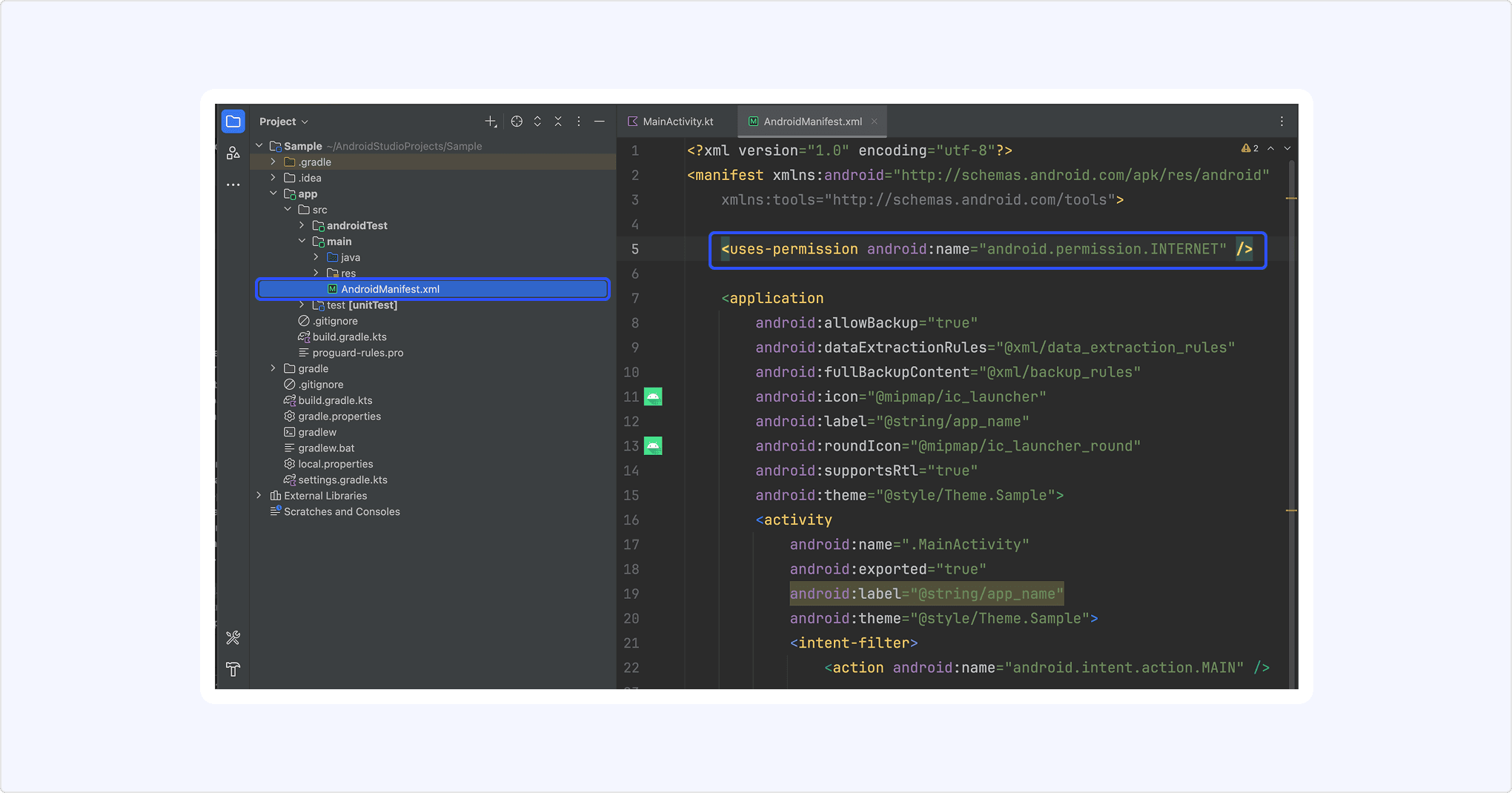
To enable shrinking, obfuscation, and optimization when building the release version of the app, add the following codes in the ProGuard rules file to exclude the Kakao SDK from shrinking and obfuscation.
Set Gradle by declaring a Maven repository to sync the project with the Android SDK. Depending on the version of Android Studio, the file to declare repositories is different. Refer to Dependency management in Gradle for more details.
Add the required modules to the build.gradle.kts file at the module level. You can add either all modules or only the required ones.
To use the Android SDK, install and then initialize it by including the app’s Native app key in the init() method. The Native app key can be found in [App] > [Platform Key] > [Native app key] on the app management page.
If you are using a class that extends Application, you can initialize it as shown below.
You must also set the name of the class that performs Kakao SDK initialization in the application of AndroidManifest.xml. In the example above, initialization was done in the GlobalApplication class, so add the same name in the settings as shown below.
Refer to the following documents when reading the developer documentation.
- Notation guide: Explains the notation conventions and how to read the parameter and field tables in the documentation.
- Glossary: Explains the terms used in the documentation.
The modules and main features of Android SDK are below.
| Module | Client | Description |
|---|---|---|
v2-common | - | Common module for essential elements Main features: Initialize |
v2-auth | AuthApiClient | Module for the authentication and token management through Kakao Login Main features: Check token presence API |
v2-user | UserApiClient | Module for the Kakao Login APIs Main features: Kakao Login API, Retrieve user information API |
v2-share | ShareClient | Module for the Kakao Talk Share APIs Main features: Send message with custom template API |
v2-talk | TalkApiClient | Module for the Kakao Talk Channel, Kakao Talk Social, Kakao Talk Message APIs Main features: Follow Kakao Talk Channel API |
v2-template | - | Module for message templates |
v2-friend | PickerClient | Module for the picker APIs Main features: Retrieve friends through picker API |
v2-navi | NaviClient | Module for the Kakao Navi APIs |
v2-cert | CertApiClient | Module for the Kakao Certification APIs |
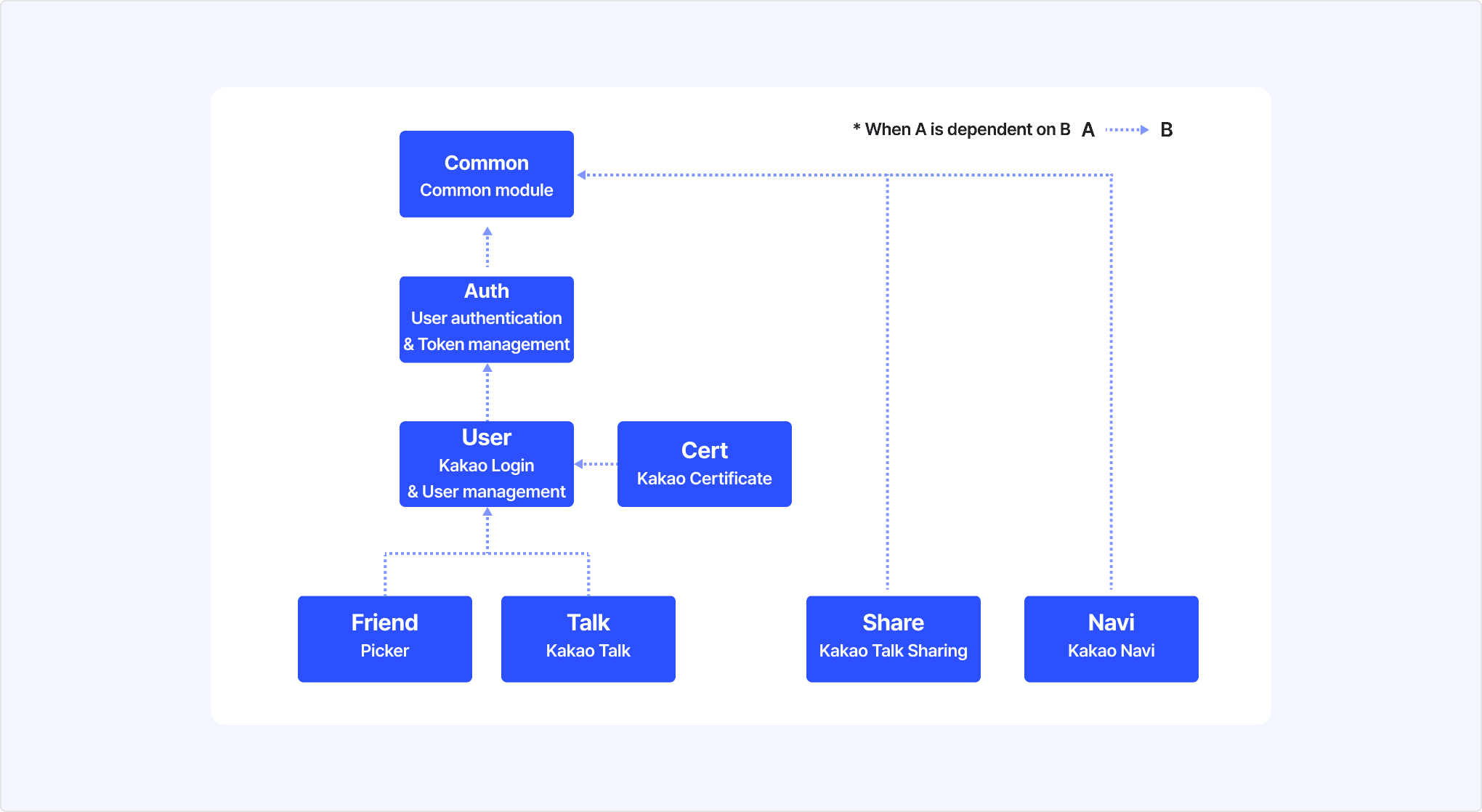
Some modules in the Kakao SDK are dependent on another module. Each subordinate module is automatically added together.
Kakao SDK module dependency tree