
This document introduces the Kakao Talk Message API.
- The Kakao Talk Message API supports sending messages only between users within the same service.
- You must have permission to use the Kakao Talk Social API to use the feature to send messages to friends.
- For details, see Message sending features and How to use.
The Kakao Talk Message API is a feature that allows users to send messages to their Kakao Talk friends who use the same service for the purpose of interaction. This feature can be used to send messages between service users for interaction or sharing purposes, or to send messages to themselves.
Kakao Talk Message sending flow diagram
For the types and characteristics of various message sending features provided by Kakao, see Message sending features. For the differences between the message sending features provided by Kakao Developers, see Differences between Kakao Talk Share and Kakao Talk Message features.
Kakao Talk Message usage scenario example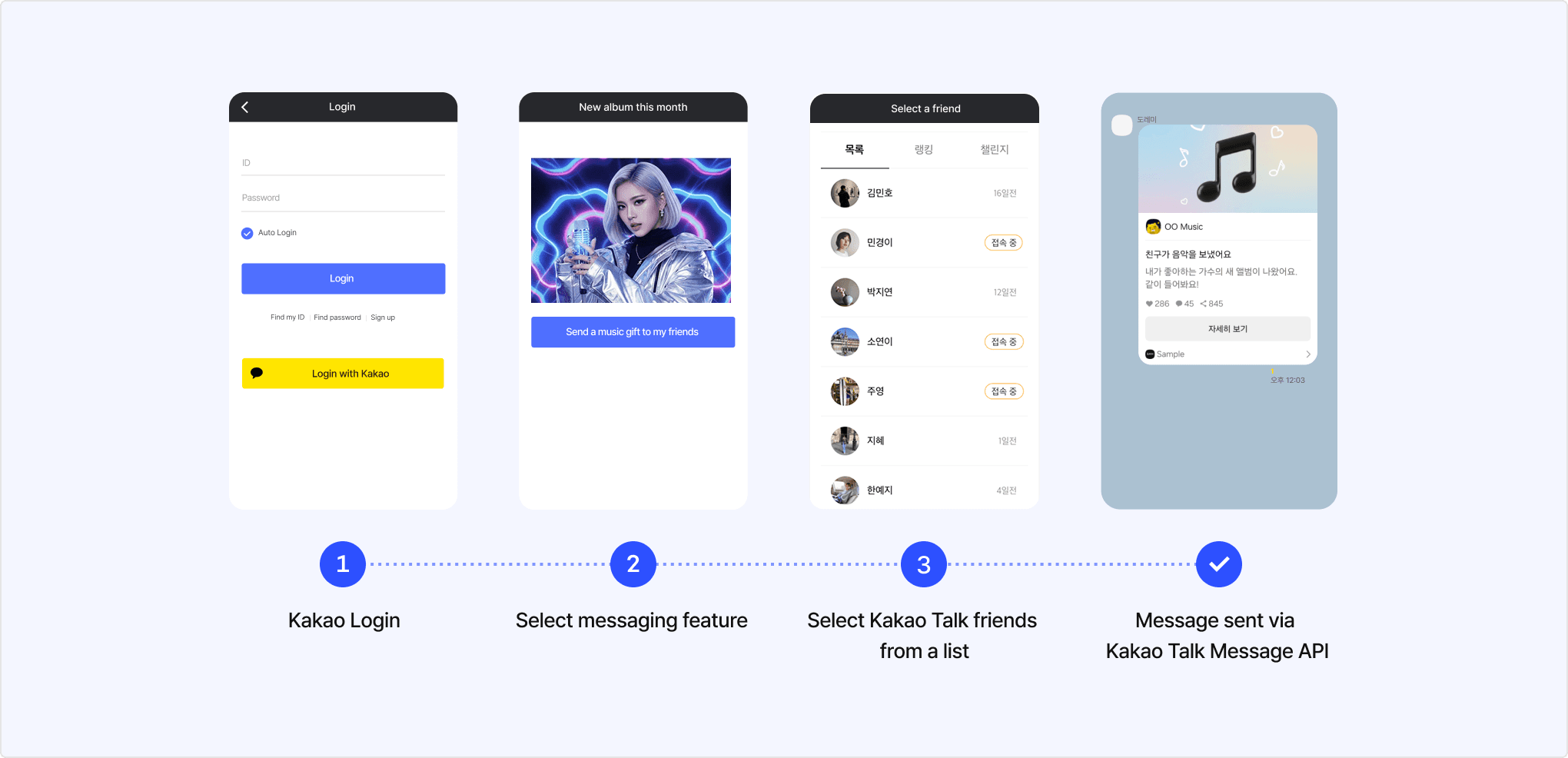
To apply the feature of sending messages to friends using the Kakao Talk Message API in your service, you must request additional features and obtain permission. Follow the steps below.
- Check: Check whether you need the Kakao Talk Message feature among the Kakao message sending features in Message sending features.
- Configure: In [Kakao Login] > [Consent Items] on the app management page, set the following two consent items.
- [Personal Information] > [Friends list in Kakao service (including profile photo, nickname, favorites)]
- [Access Permission] > [Send Kakao Talk Message]
- Develop: Implement the message sending feature by referring to the platform-specific development documentation. When implementing, refer to the Kakao Talk Message sending flow.
- Test: Verify that the feature works for app members. You can test within the defined quota.
- Review: Request permission by following the steps below.
- Switch to Biz app
- Check eligibility
- Business information review
- Request additional features: In [App] > [Request additional features] > [Kakao Talk friend list / message], enter the Additional feature application information and submit the request
- Service information: Enter the service web page or application download URL.
- Service app screen: Upload a screenshot of the actual screen where the message sending feature is applied.
- Only one file in JPG, JPEG, PNG, or PDF format under 20 MB can be uploaded.
- Reason and Scenario: Describe in detail the purpose for which this feature is needed in your service, and the scenario in which a user logs in to the service and sends a message to their Kakao Talk friends.
You must mask all personal information in screenshots and application forms before submitting. If personal information is included in the application, the request is rejected for the purpose of personal information destruction.
This section explains how a user sends a Kakao Talk Message from a service. Refer to the sequence diagram and step-by-step explanation below.
Kakao Talk Message sending flow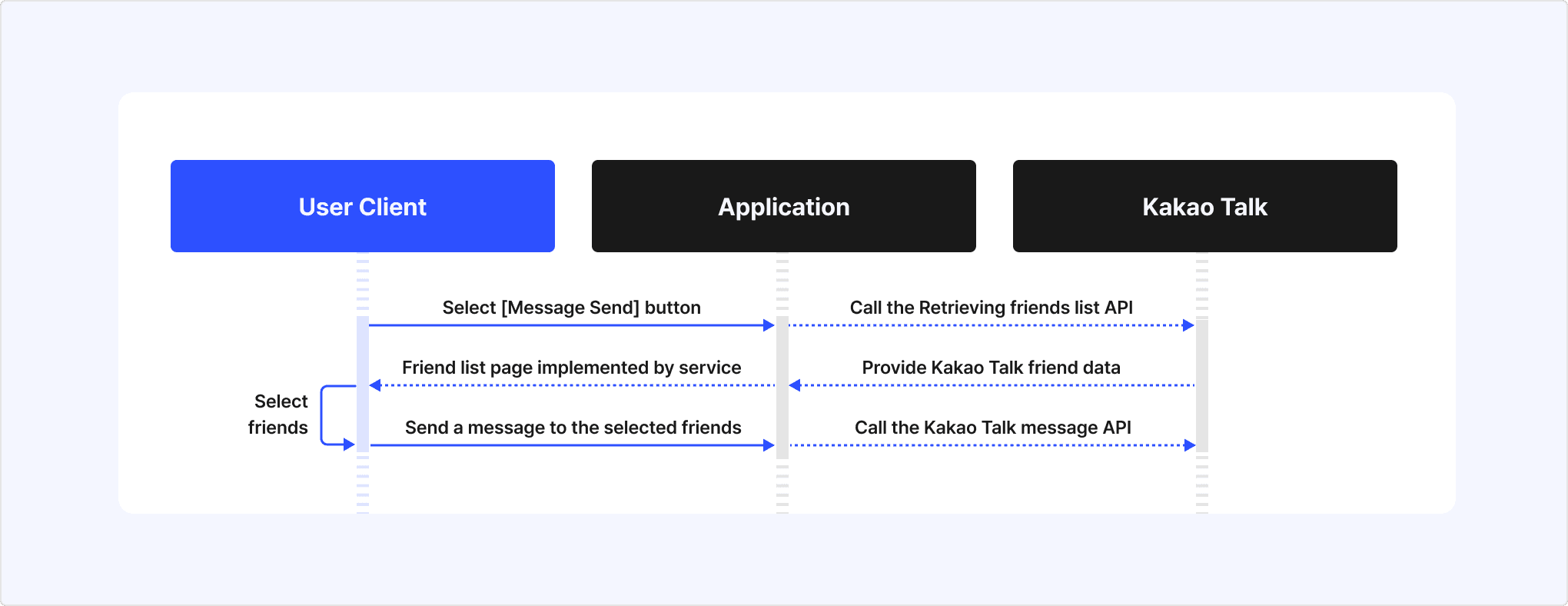
- When a user selects the Kakao Talk Message send button on the service screen, the service provides a UI to select recipients through one of the following methods.
- Call the Friends picker API.
- Provide a UI for users to select desired recipients from the Retrieve friends list API response.
- When the user selects the desired recipients using the Friend picker or service UI, the service receives the recipient information as a response.
- The service sends a Kakao Talk message by calling the Kakao Talk Message API with the recipient information and message parameters composed with a message template.
This section introduces various Kakao Talk message sending features provided by Kakao. The differences between products can be found in the table below.
| Product | Description | Message sender → Recipient | Available platform |
|---|---|---|---|
| Kakao Talk Share | Users select content in the service and share it to Kakao Talk chatrooms themselves. Recommended use: Implementing content sharing features between users. | Kakao Talk user → User's Kakao Talk friends | Kakao Developers |
| Kakao Talk Message | Users send messages to their Kakao Talk friends who use the same service, for interaction purposes. Recommended use: Implementing message sending for user interactions. | Service's Kakao Login user → Service's Kakao Login user | Kakao Developers |
| Kakao Moment Personalized Message | Sends promotional personalized messages containing customer-specific data when customer behavior events occur. Can be configured in Moment Admin Center or using the Kakao Moment Personalized Message Management API. Recommended use: Sending targeted promotional messages via API. | Agency/Service → User | Kakao Developers, Kakao Business |
| Brand Message | Promotional messages sent through dealers to members who have consented to receive marketing. Recommended use: Sending bulk promotional messages. | Dealer/Service → User (Limited to members who have consented to receive marketing.) | Kakao Business |
| Kakao Talk Channel Message | Sends promotional or informational messages through Kakao Talk Channel. Recommended use: Sending promotional messages. | Service's Kakao Talk Channel → User | Kakao Business |
| Info Talk | The service sends informational messages to users. Recommended use: Sending informational messages to users. | Service's Kakao Talk Channel → User | Kakao Business |
| CS Talk | Users can open a Kakao Talk chatroom to make inquiries about the service. Recommended use: Implementing customer support using real-time chat or chatbot. | Service's Kakao Talk Channel (Only available after user initiates consultation) | Kakao Business |
Select the product that fits your service needs based on the guide below.
- If your service requires sending messages between users, choose the appropriate product between Kakao Talk Share and Kakao Talk Message.
- If your service needs to send messages directly to users, choose the appropriate product between Brand Message and Info Talk.
- If your service requires a customer support feature, select the CS Talk product.
For details on Brand Message, Info Talk, and CS Talk, see the Kakao Business document.
This section explains the differences between Kakao Talk Share and Kakao Talk Message, both of which are Kakao Talk Message sending features provided by Kakao Developers. Both features only support user-to-user messaging, and services cannot send messages directly to users.
Refer to the table below to check the feature differences and choose the product that best suits your service requirements.
| Item | Kakao Talk Share | Kakao Talk Message |
|---|---|---|
| Message recipients | All Kakao Talk friends of the user | Friends who meet the information provision conditions of the Retrieve friends list API. |
| Recipient selection UI | No separate implementation required. | Requires calling the Friend picker API or implementing a UI using the Retrieve friends list API. |
| Message sending method | When the user selects recipients in the Kakao Talk app, the sharing message is automatically sent. | After providing a recipient selection UI, the Kakao Talk Message API must be called with the selected recipients. |
| Permission required | X | O |
| REST API supported | X | O |
| Confirmation of message delivery success | Confirm via the Kakao Talk Share webhook. | Confirm via API response. |
Differences between Kakao Talk Share and Kakao Talk Message features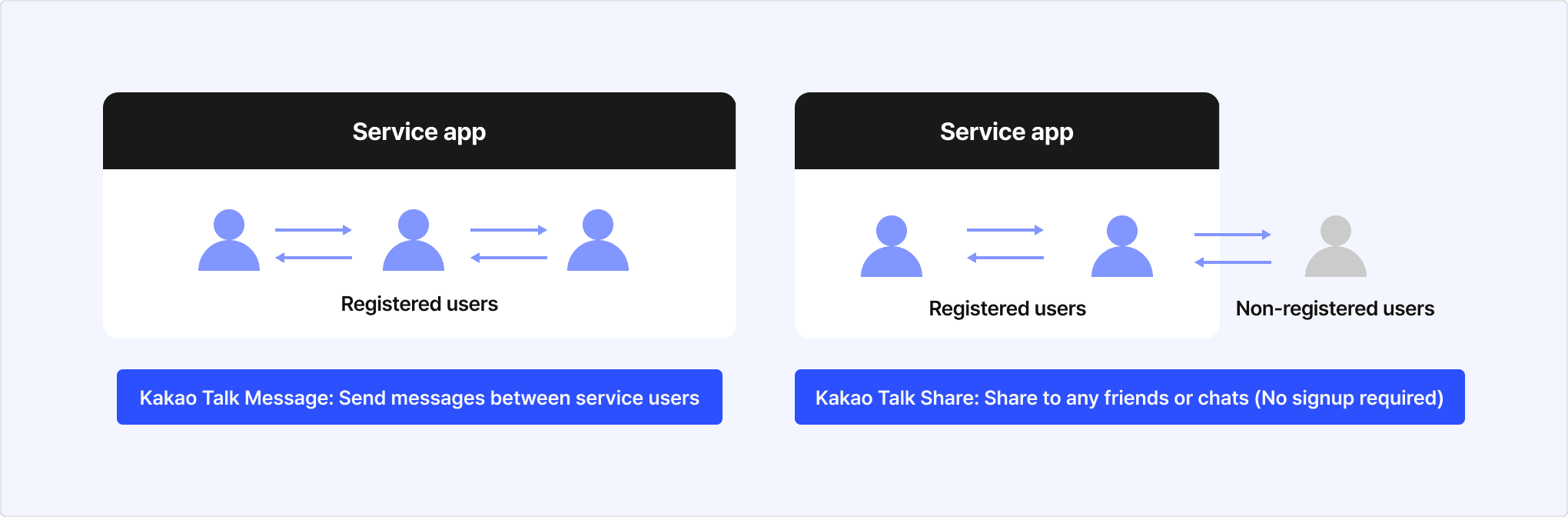
When sending Kakao Talk messages, you can use predefined default templates or custom templates that you configure using the message template tool. Refer to the respective documentation for usage instructions for each template type.
Kakao API applies monthly and daily quotas for stable service.
Sending limits for the Kakao Talk Message API differ by message type and permission status.
| Message type | Send to me | Send to friends |
|---|---|---|
| Before review approval | No sending count limit | You can send test messages up to 30 messages per day. Reset test quota:
|
| After review approval | No sending count limit | You can send messages within the defined Quota. Up to 30,000 messages per day per app are available, but the following daily limits also apply to protect users from frequent messages.
|
Messages sent via the Kakao Talk Message API include a profile visibility settings button in the message bubble. Users can press this button to set whether to show their profile on the friends list of that app. Users with this setting set to private are not included in the picker friends list and the Retrieve friends list response, so their uuid required for sending Kakao Talk messages cannot be retrieved and messages cannot be sent. For more details, refer to Profile visibility settings.
If your service server's firewall blocks access from Kakao's scraping server, image transmission may be very slow or images may not be displayed. In this case, refer to Firewall to allow Kakao scraping server IPs in your ACL (Access Control List).
Refer to Scope of support to know whether each Kakao SDK supports each feature.
| API | Method | URL | Description |
|---|---|---|---|
| Send me message with default template | POST | https://kapi.kakao.com/v2/api/talk/memo/default/send | Sends a message to the user's My Chatroom using the predefined default template in JSON format. |
| Send me message with custom template | POST | https://kapi.kakao.com/v2/api/talk/memo/send | Sends a message to the user's My Chatroom using a custom template configured in [Tools] > [Message Template]. |
| Send me scrape message | POST | https://kapi.kakao.com/v2/api/talk/memo/scrap/send | Sends a scrape message to the user's My Chatroom using information extracted from the specified web page URL. |
| Send message with default template | POST | https://kapi.kakao.com/v1/api/talk/friends/message/default/send | Sends a message composed in JSON according to the predefined default template format. |
| Send message with custom template | POST | https://kapi.kakao.com/v1/api/talk/friends/message/send | Sends a message using a custom template configured in [Tools] > [Message Template]. |
| Send scrap message | POST | https://kapi.kakao.com/v1/api/talk/friends/message/scrap/send | Sends a scrape message using information extracted from the specified web page URL. |