This document guides how to use the Kakao SDK for iOS("iOS SDK") provided by the Kakao Developers.
The minimum requirements for iOS SDK are below.
- Xcode 26 or higher
- iOS 15.0 or higher
- iOS Deployment Target 15.0 or higher
- Swift 5.0 or higher
The iOS SDK uses the following libraries that are automatically installed when installing the iOS SDK.
Set iOS app information in [App] > [Platform Key] > [Native app key] on the app management page. Refer to Native app key.
Kakao Developers provides a sample app that lets you quickly check the main features of the iOS SDK. You can directly test SDK features such as Kakao Login and Kakao Talk Share with the sample app, and check the implementation example code.
This section describes how to run the iOS SDK sample app.
- Download the iOS SDK sample app from Download.
- The iOS SDK sample app is a project based on tuist. In the project root path, run the
tuist installandtuist generatecommands in order to add dependencies and generate an Xcode project. - You can run the sample app to test key features of the iOS SDK and review example implementation code.
Since iOS 9.0, iOS only allows apps registered in Allowlist to enhance security. Register Allowlist to allow the app to run Kakao Talk.
- Add the
Queried URL Schemeskey with an array type on [Info] > [Custom iOS Target Properties]. - Add below text to the [Item] value of the key.
kakaokompassauth: Kakao Loginkakaolink: Kakao Talk Sharekakaoplus: Kakao Talk Channel
How to register Allowlist in Xcode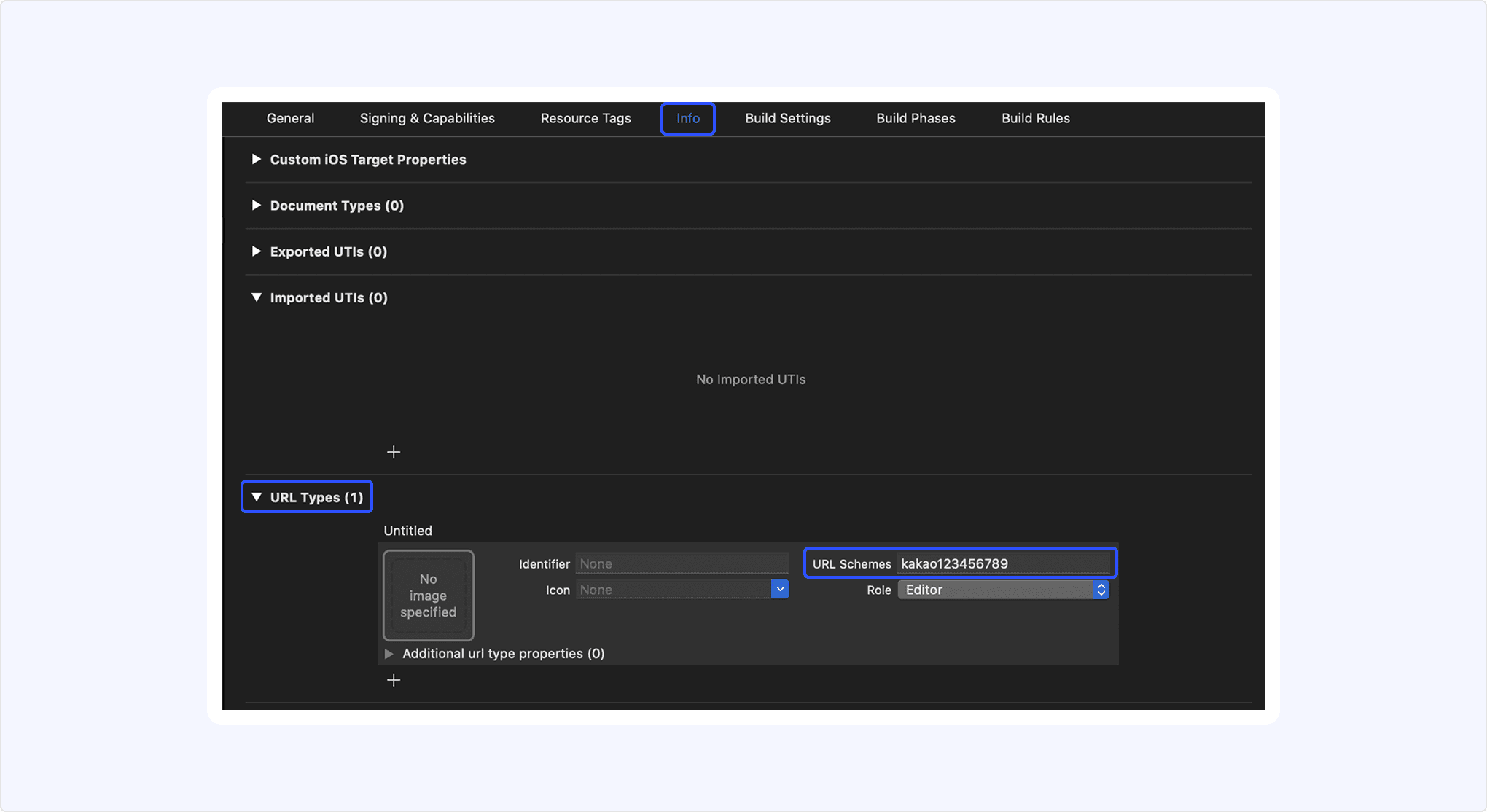
Or add the keys manaully in the Info.plst file as follows.
Set the Native app key in kakao${YOUR_NATIVE_APP_KEY} format on [Info] > [URL Type] > [URL Schemes]. For example, if your Native app key is 123456789, set 'URL Schemes' to "kakao123456789".
How to set custom URL scheme in Xcode
The URL Schemes are used to generate the Custom URL Scheme. The Custom URL Scheme is used to run the service app through a Kakao Talk message or to go back to the service app after Kakao Login. The Custom URL Schemes are in the following format.
- Kakao Login:
kakao${NATIVE_APP_KEY}://oauth - Kakao Talk Share:
kakao${NATIVE_APP_KEY}://kakaolink
To install the Kakao SDK, use Swift Package Manager (SPM).
Install using Cocoapods is no longer supported in iOS SDK 2.23.0 or higher version.
Select your project in [1] [PROJECT] and click [3][+] under [2] [PACKAGE DEPENDENCIES] > [PACKAGES].
SPM Setting screen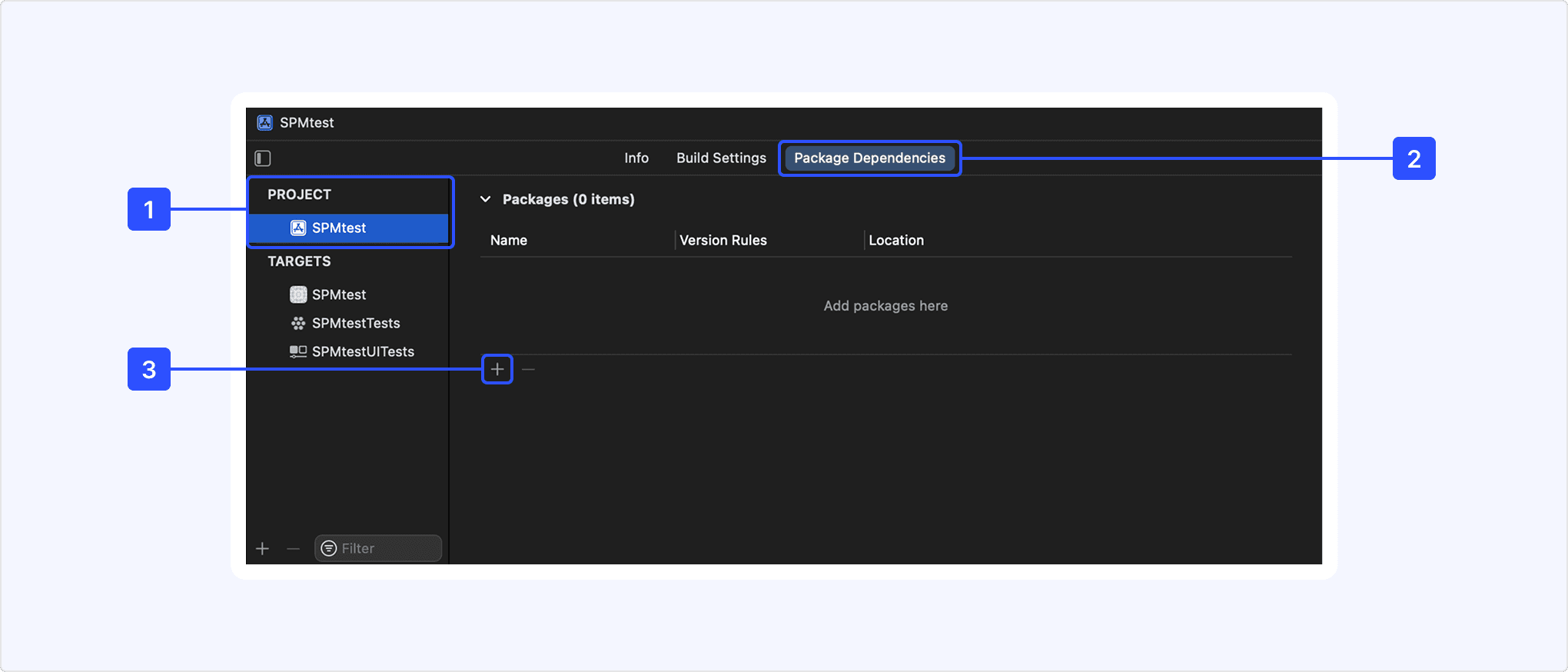
Search the repository URL below for the iOS SDK in [4].
| SDK | Repository Name | Repository URL |
|---|---|---|
| iOS SDK | kakao-ios-sdk | https://github.com/kakao/kakao-ios-sdk |
| ReactiveX iOS SDK | kakao-ios-sdk-rx | https://github.com/kakao/kakao-ios-sdk-rx |
Check the name of the repository and select [Branch] in [5] [Dependency Rule]. Input the branch name as master and click [6] [Add Packages].
Search screen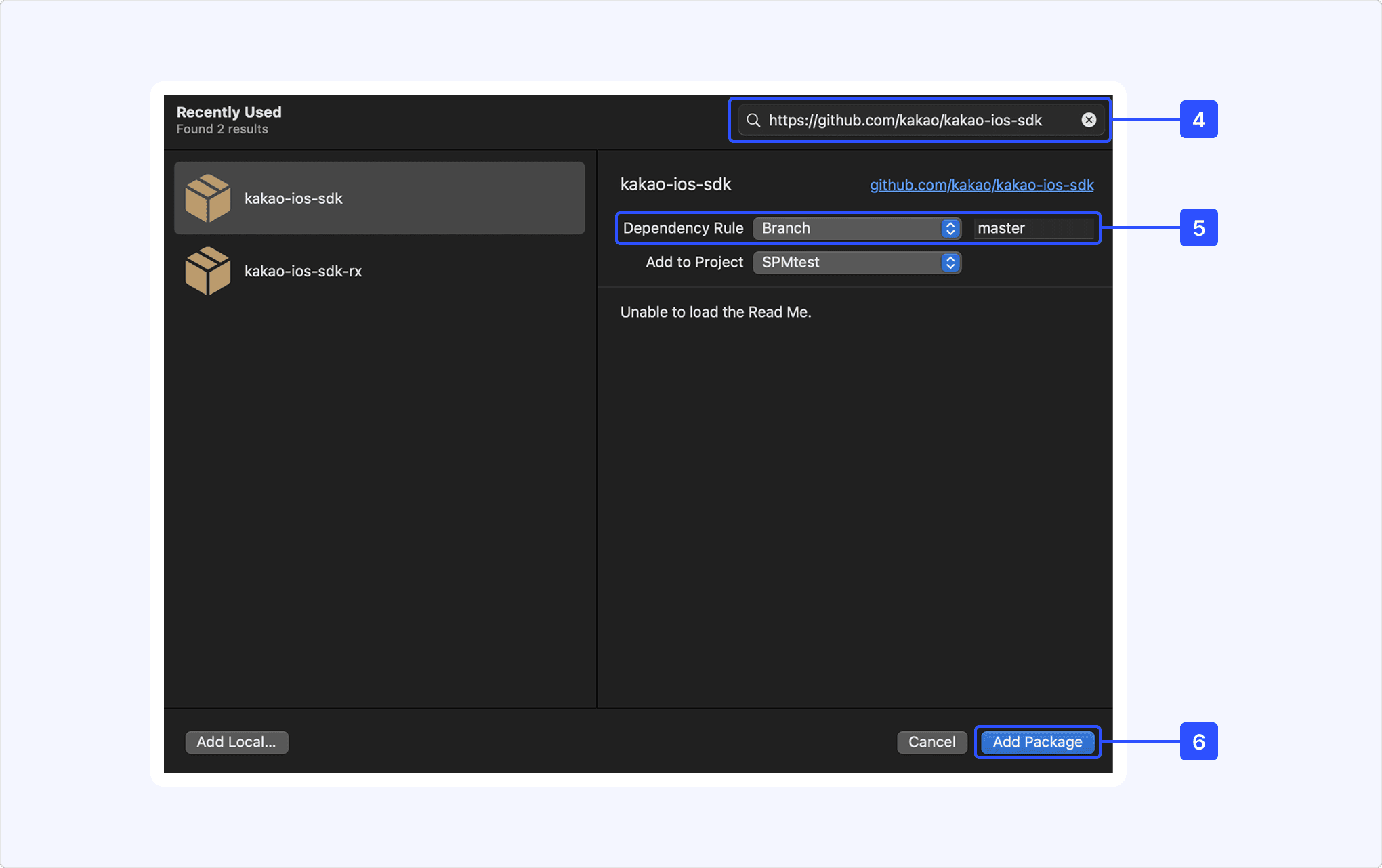
Set [Dependency Rule] to install a specific version. But only versions higher than 2.8.5 are available.
On the screen presenting available packages, check the desired modules in [7] [Package Product] and click [8] [Add Packages]. To install all of the modules, select [KakaoSDK] or [RxKakaoSDK].
Select packages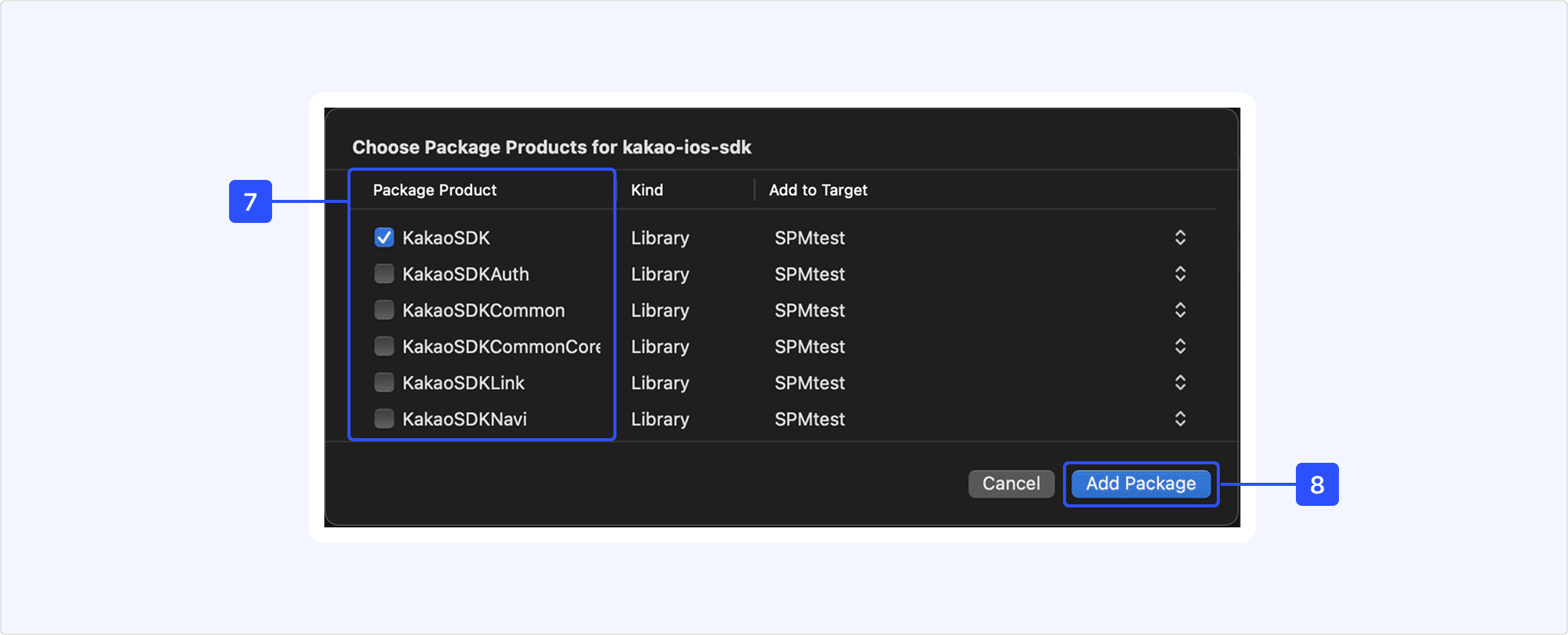
The installed iOS SDK is presented on [Packages].
Packages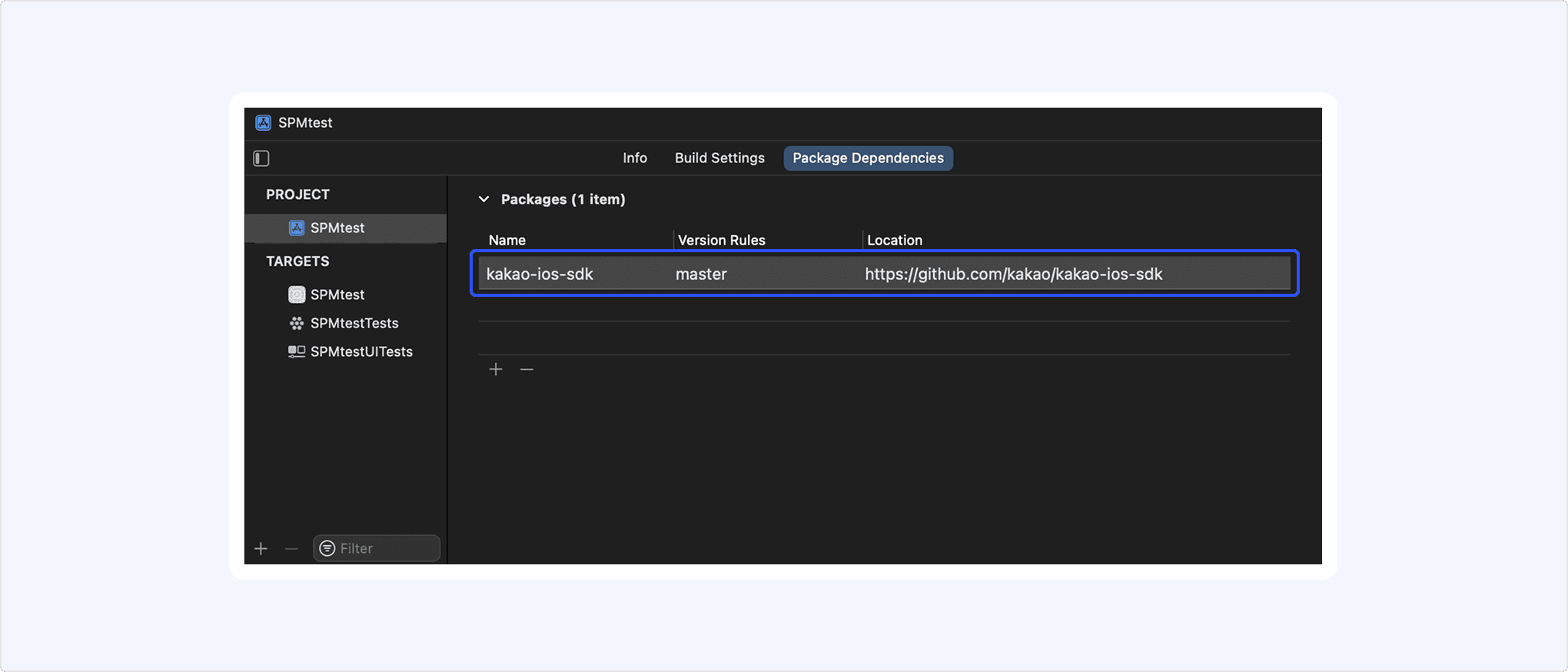
Each target of the project requires the iOS SDK separately. To install the iOS SDK for the test app, set the [Add to Target] to the test app.
When using SPM to install KakaoSDKFriend and RxKakaoSDKFriend modules, set the resource bundle for the picker. Add KakaoSDKFriendResources.bundle file to [Build Phase] > [Copy Bundle Resources] by clicking [+] or drag and drop.
Set resource bundle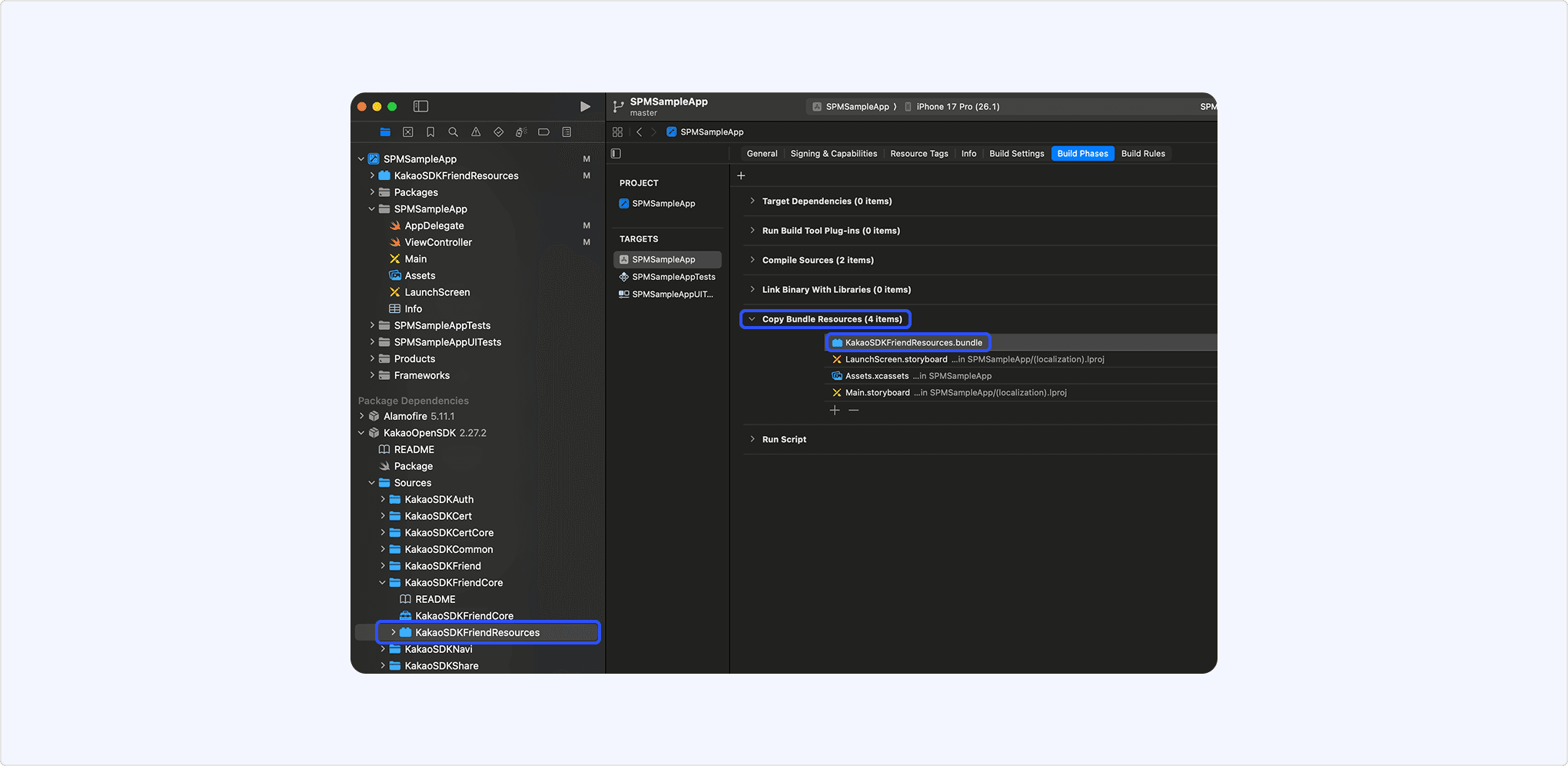
To use iOS SDK in the app, import files of the required modules. Required modules for each product are below.
To use iOS SDK in an iOS app, you must import the iOS SDK as shown below and initialize it with the Native app key using the initSDK() method. Add the code to initialize Kakao SDK in AppDelegate.swift.
When using the SwiftUI App Life Cycle, the ${PROJECT_NAME}App class generated with the project replaces AppDelegate.swift. In this case, add the Kakao SDK initialization code inside that class.
In iOS SDK 2.8.3, the class names, used for initialization, have been changed.
- KakaoSDKCommon → KakaoSDK
- RxKakaoSDKCommon → RxKakaoSDK
Refer to the following documents when reading the developer documentation.
- Notation guide: Explains the notation conventions and how to read the parameter and field tables in the documentation.
- Glossary: Explains the terms used in the documentation.
The modules and main features of iOS SDK are below.
| Module | Client | Description |
|---|---|---|
KakaoSDKCommon | - | Common module for essential elements Including PrivacyInfo.xcprivacy fileMain features: Initialize |
KakaoSDKAuth | AuthApi | Module for the authentication and token management through Kakao Login Main features: Check token presence API |
KakaoSDKUser | UserApi | Module for the Kakao Login APIs Main features: Kakao Login API, Retrieve user information API |
KakaoSDKShare | ShareApi | Module for the Kakao Talk Share APIs Main features: Send message with custom template API |
KakaoSDKTalk | TalkApi | Module for the Kakao Talk Channel, Kakao Talk Social, Kakao Talk Message APIs¹⁾ Main features: Follow Kakao Talk Channel API |
KakaoSDKTemplate | - | Module for message templates |
KakaoSDKFriend | PickerApi | Module for the picker APIs¹⁾ Main features: Retrieve friends through picker API |
KakaoSDKFriendCore | - | Module for the operations of the picker |
KakaoSDKNavi | NaviApi | Module for the Kakao Navi APIs |
KakaoSDKCert | CertApi | Module for the Kakao Certification APIs¹⁾ |
KakaoSDKCertCore | - | Module for the operations of the Kakao Certificate Including PrivacyInfo.xcprivacy file |
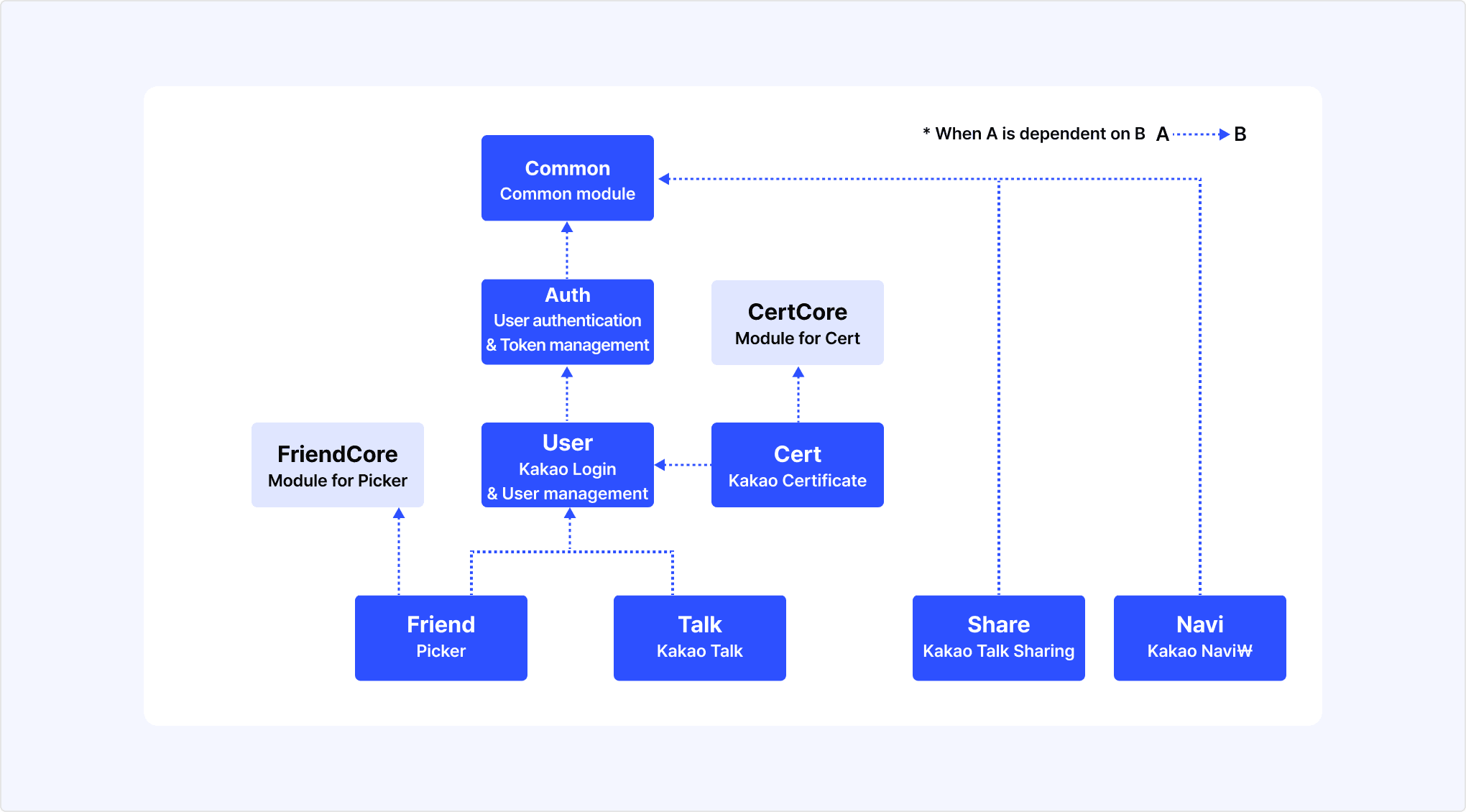
KakaoSDKUser module together for login-based APIsSome modules in the Kakao SDK are dependent on another module. If you add the Common or Auth module, its subordinate modules are automatically added together.
Kakao SDK module dependency tree