
This document introduces the features of the Kakao Talk Social APIs.
The Kakao Talk Social API provides Kakao Talk friends information, including profiles, of users registered to the service. Using the provided Kakao Talk friends information, you can send Kakao Talk Message or build services where Kakao Talk users are organically connected.
Example of using friend information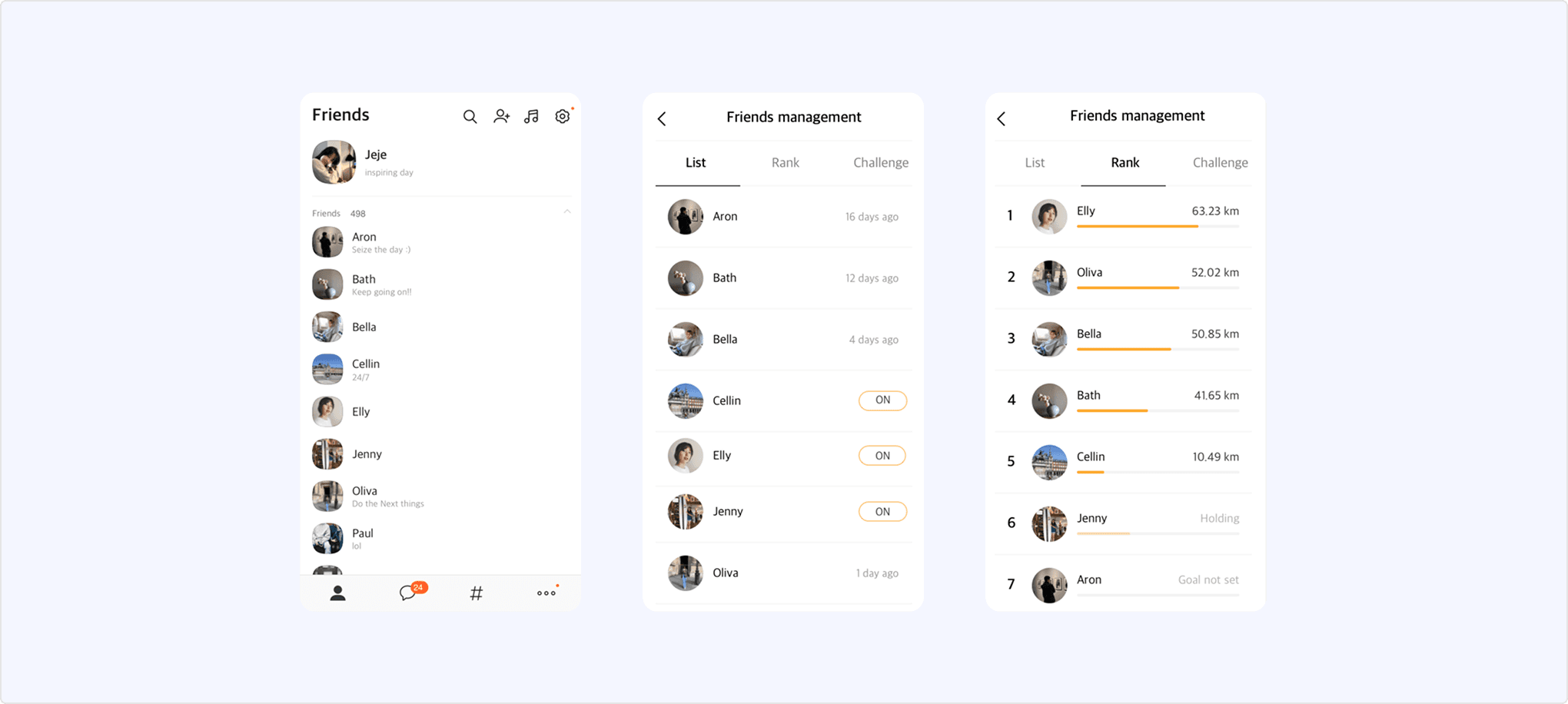
- The service must not use the provided Kakao Talk friends information for any purpose other than the stated provision purpose.
- Any act of analyzing or combining friends information, providing it to other users, or storing it for purposes other than improving the user experience is strictly prohibited.
To use the Kakao Talk Social API, the app requires permission. In apps without permission or in a test app, only the app’s members can make calls, and the response scope is limited to those members. After obtaining permission, the feature can be provided to all users in the live service.
You can request permission through the process below.
- On the app management page, go to [Kakao Login] > [Consent items] > [Personal information], and set the [Friends List in Kakao Service(Including profile image, nickname, and favorites)(
friends)] consent item to [Consent during use]. (Note: Consent items) - Refer to Methods for requesting Kakao Talk friends information, implement the required social features in the service using the appropriate method, and perform call tests targeting the app’s members.
- On the app management page, go to [App] > [Request additional features]. Under [Additional features], select [Request] for [Kakao Talk friend list / message].
- Under [A] Check application conditions, select the permission you need.
- Kakao Talk friend list: Select this if you only need permission to retrieve the Kakao Talk friends list.
- Kakao Talk friend list / message: Select this if you also need permission to send messages to users selected from the friends list.
- Select [Next], and check [B] Guideline for permission request.
- Select [Next], and enter the following request information.
- [C] Service information: Enter the service web page or application download URL.
- Important: You must mask all personal information in screenshots and application forms before submitting. If personal information is included, the request is rejected for the purpose of personal information destruction.
- [D] Service app screen: Upload a screenshot of the actual screen where the message sending feature is applied.
- Only one file in JPG, JPEG, PNG, or PDF format under 20 MB can be uploaded.
- [E] Reason and Scenario: Describe in detail why your service needs this feature and the scenario from when a user logs in to the service until the user retrieves their Kakao Talk friends.
- [C] Service information: Enter the service web page or application download URL.
Request additional features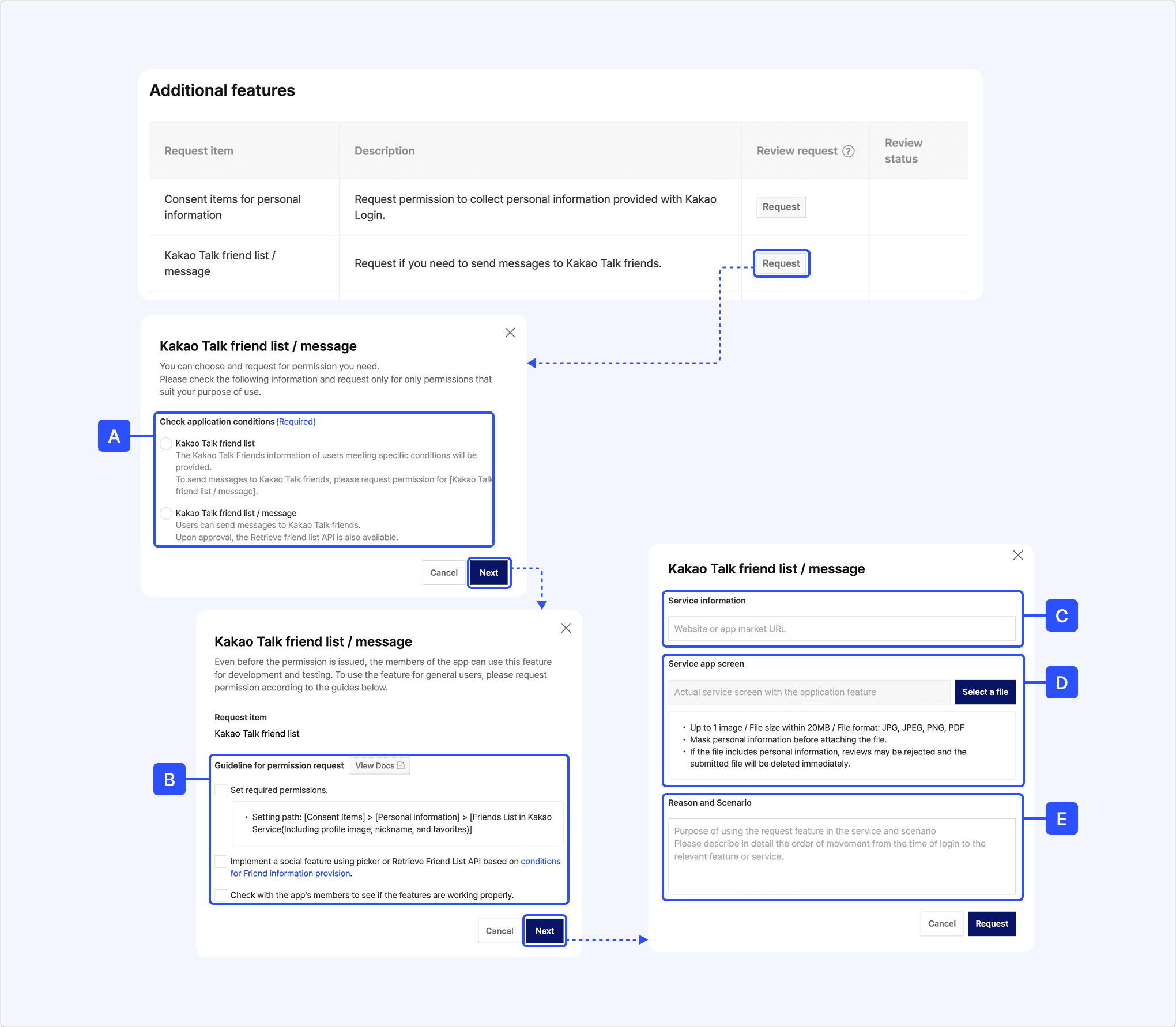
The review takes 3–5 business days. When the review is approved, an email notification is sent to the app members.
After approval, you can set the consent item for [Friends List in Kakao Service(Including profile image, nickname, and favorites)] to [Optional consent]. Note that the Kakao Talk friends information response includes only friends that meet the Conditions for providing friends information.
Kakao Talk friends information can be obtained through the Friends picker or the Retrieve friends list API. The friends information includes the unique ID (uuid) required to send Kakao Talk Message.
| Category | Friends picker | Retrieve friends list API |
|---|---|---|
| Description | When the picker is invoked with the Kakao SDK in the service, the friends list picker screen provided by Kakao is displayed, and data of the friends selected by the user is provided to the service. | Provides the user’s Kakao Talk friends list data in the API response. |
| Use cases | When you want to easily use the Kakao Talk friends list without implementing your own friends list UI. When data of specific friends selected by the user is required, such as for sending Kakao Talk Message. | When you want to directly implement and provide a friends list tailored to the service UI. |
| Friends list UI implementation | Not required. | Required. |
| Supported environments | Web, app. | Server, web, app. |
| Scope of support | Kakao SDK (JavaScript, Android, iOS, Flutter). | REST API Kakao SDK (JavaScript, Android, iOS, Flutter). |
Profiles provided by the Kakao API include the Kakao Talk profile and the Kakao Account profile. These two profiles may not match. Each profile can be requested using the methods below.
- Kakao Talk profile: Friends picker, Retrieve friends list API.
- Kakao Account profile: Retrieve user information API.
If the user enables the [Always keep it up to date] option in [Settings] > [Kakao Account] > [Manage MyInfo] > [Profile Update Settings] on the Kakao Talk or Kakao Account management page, the Kakao Account profile information is kept the same as the Kakao Talk profile information.
The Friends picker is a user interface that allows users to select Kakao Talk friends. By using the Friends picker API, you can display the Friends picker screen provided by the Kakao SDK to users and receive information about the friends they select.
The Friends picker interface supports Korean, English, and Japanese, and is automatically applied based on the system language setting of the user’s device.
You can optionally configure the components of the Friends picker using parameters based on service requirements. For configuration details, see Picker: Select friends API in the Developer documentation.
- Display format: Popup view or full screen view (JavaScript SDK supports full screen only).
- Friend selection type: Multi-picker or single-picker.
- For multi-picker, configure whether to display selected friends and set the minimum and maximum number of selectable friends.
- Change the title text at the top of the picker screen: displays “Select friends” if not set.
- Display mode: Light, dark, or auto (automatically follows system display settings).
- Picker screen orientation: Landscape or portrait.
- Enable or disable friend search.
- Enable or disable index view.
- Show or hide my profile.
- Show or hide favorite friends.
The Friends picker supports a full screen format that occupies the entire screen and a popup view format that appears over the screen. (However, the JavaScript SDK supports the full screen format only.)
Display format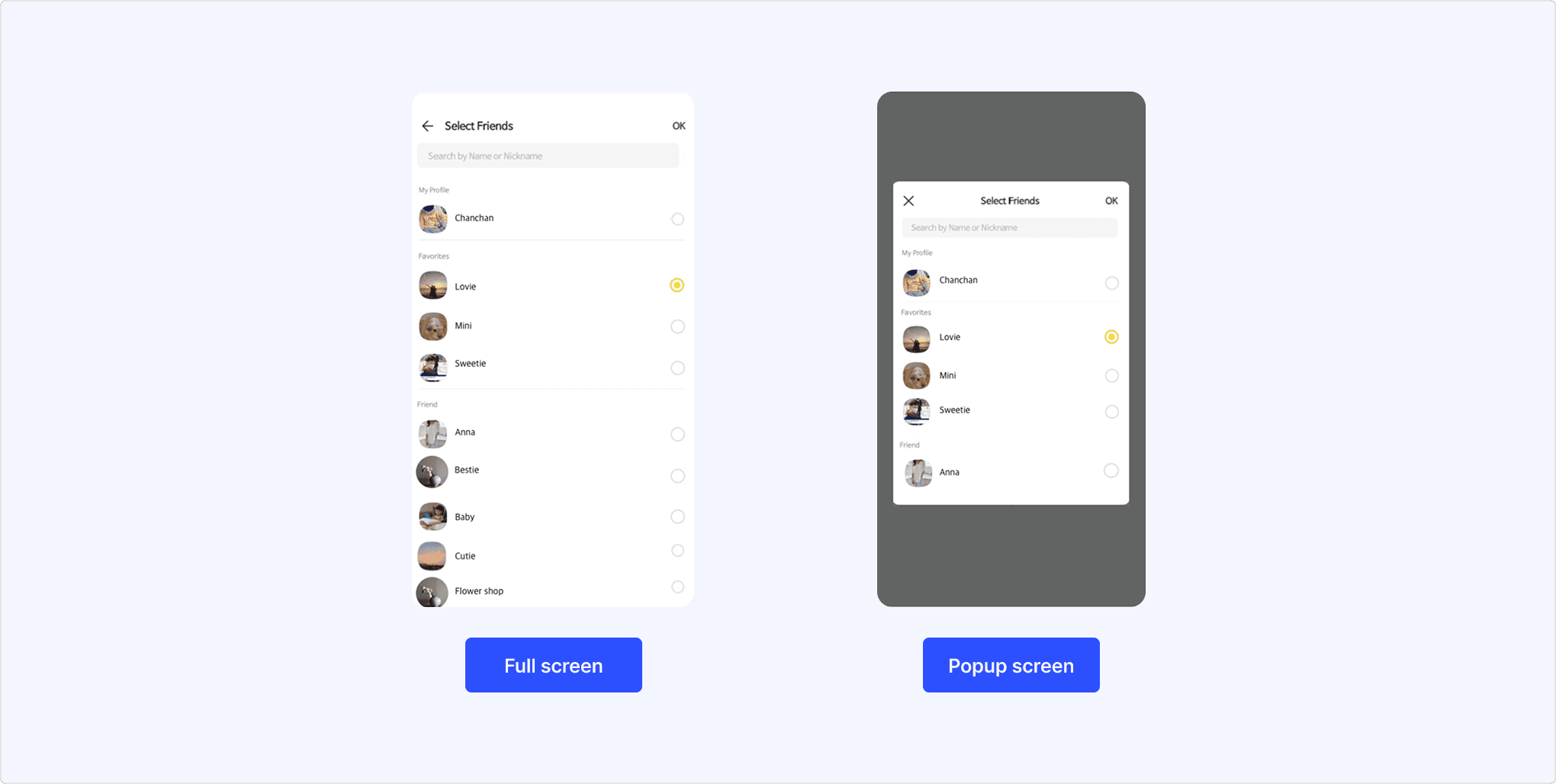
The Friends picker supports a multi-picker, which allows selecting multiple friends, and a single-picker, which allows selecting only one friend.
Friends picker example screen
Kakao APIs apply monthly and daily quotas to ensure stable service operation. You can check the currently applied quota information in Quota. To increase the applied quota limits, consultation and partnership are required, so make a separate inquiry.
Information of users who have set [Show my profile on Friends list] to [Disagree], or who have [Revoked consent] for the corresponding consent item, is not included in the Kakao Talk friends information API response. (They are also excluded from the friends count.)
Users can manage this setting directly through the [Preferences] button at the bottom of the message bubble of the recipient (not displayed in the sender’s bubble), or on each app information page in [Settings] > [Kakao Account] > [Manage Connected Services] in Kakao Talk.
Profile visibility settings screen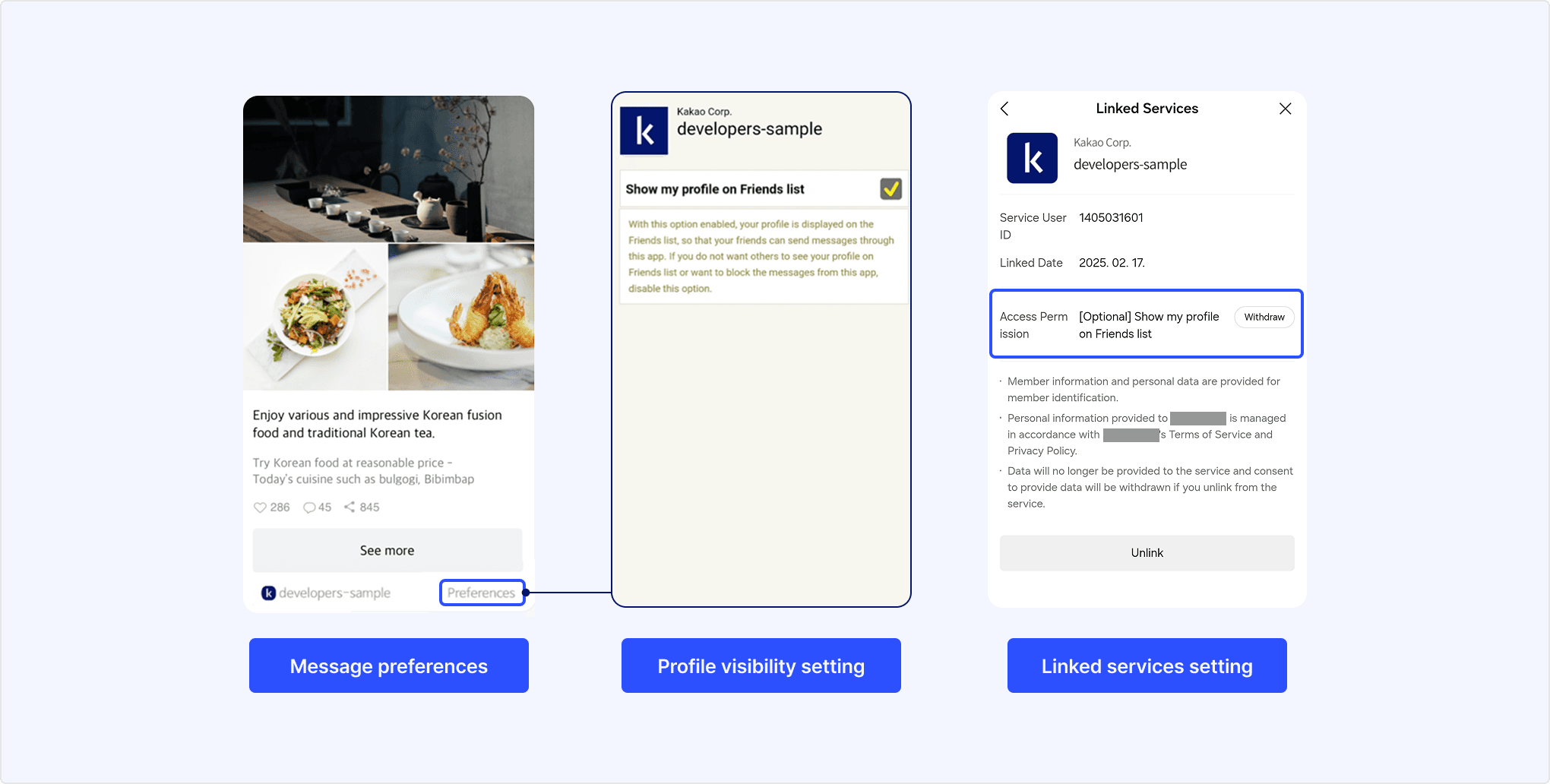
For users with a private profile, the uuid required to send Kakao Talk Message cannot be obtained, so Kakao Talk messages cannot be sent.
For users who have enabled the multi-profile feature (showing different profiles to different Kakao Talk friends), the nickname (nickName) and profile image URL (profileImageUrl) in the Kakao Talk friends information API response follow the priority below.
- Nickname
- Friend name set by the user.
- Friend name from the user’s device contacts.
- Multi-profile nickname set to be shown to the user (if the friend uses multi-profile).
- Default profile nickname set by the friend.
- Profile image URL
- URL of the multi-profile image set to be shown to the user (if the friend uses multi-profile).
- URL of the default profile image set by the friend.
If the user disables the friend name sync setting ([Kakao Talk] > [More] > [Settings] > [Friends] > [Sync Friends List]), services or devices not used for identity verification respond with the default profile nickname set by the friend.
The Kakao Talk profile API, which requests the user’s own information, always uses the default profile information set by the user and is not affected by multi-profile.
When a user changes their Kakao Talk profile, the URLs of the existing profile image and thumbnail image in the Kakao Talk friends information API response are deleted. To prevent data loss, always use the latest response information.
The Kakao Talk friends information API response includes only friends who meet all of the conditions below.
- The friend is linked to the app.
- The friend has agreed to the [Provide friends list in Kakao Service] consent item when linking the app.
- The friend is not a hidden or blocked friend.
- The friend’s Profile visibility setting is set to public.
Regardless of these conditions, no open API is provided to request all Kakao Talk friends information of a user. Therefore, the number of friends returned by the picker or the Retrieve friends list API may differ from the actual number of Kakao Talk friends. If a specific friend is not included in the response, see the FAQ.
Responses from the Retrieve friends list API are cached for 10 minutes. That is, once the API is called, the same friends list is returned for 10 minutes even if the friends information changes. To reflect changes in the friends list, call the API again after 10 minutes.
Refer to Scope of support to know whether each Kakao SDK supports each feature.
| API | Method | URL | Description |
|---|---|---|---|
| Retrieve Kakao Talk profile | GET | https://kapi.kakao.com/v1/api/talk/profile | Returns Kakao Talk profile information linked to the Kakao Account of the logged-in user. |
| Retrieve list of friends | GET | https://kapi.kakao.com/v1/api/talk/friends | Returns Kakao Talk friend information linked to the Kakao Account of the logged-in user. |
| Retrieve Kakao Talk profiles by user list | GET/POST | https://kapi.kakao.com/v2/api/talk/profiles | Returns the Kakao Talk profile list of service users. |