
This document explains, step by step, how to implement a Kakao Talk Share button on a webpage and share a message configured with a custom template.
Kakao Talk Share allows users to select a Kakao Talk friend or chatroom and share content from your service. You can use it without Kakao Login or an access token, and you do not need to obtain separate usage permission.
| Category | Details |
|---|---|
| What you will learn | A webpage that shares a message configured with a custom template through Kakao Talk |
| Prerequisites | Log in with Kakao Developers account |
To use Kakao Talk Share, complete the app settings required to run the JavaScript SDK and open links in the message.
To use the Kakao APIs, you need a Kakao Developers app. See Create Kakao Developers app and create an app to use.
- Select the app you created on the app management page.
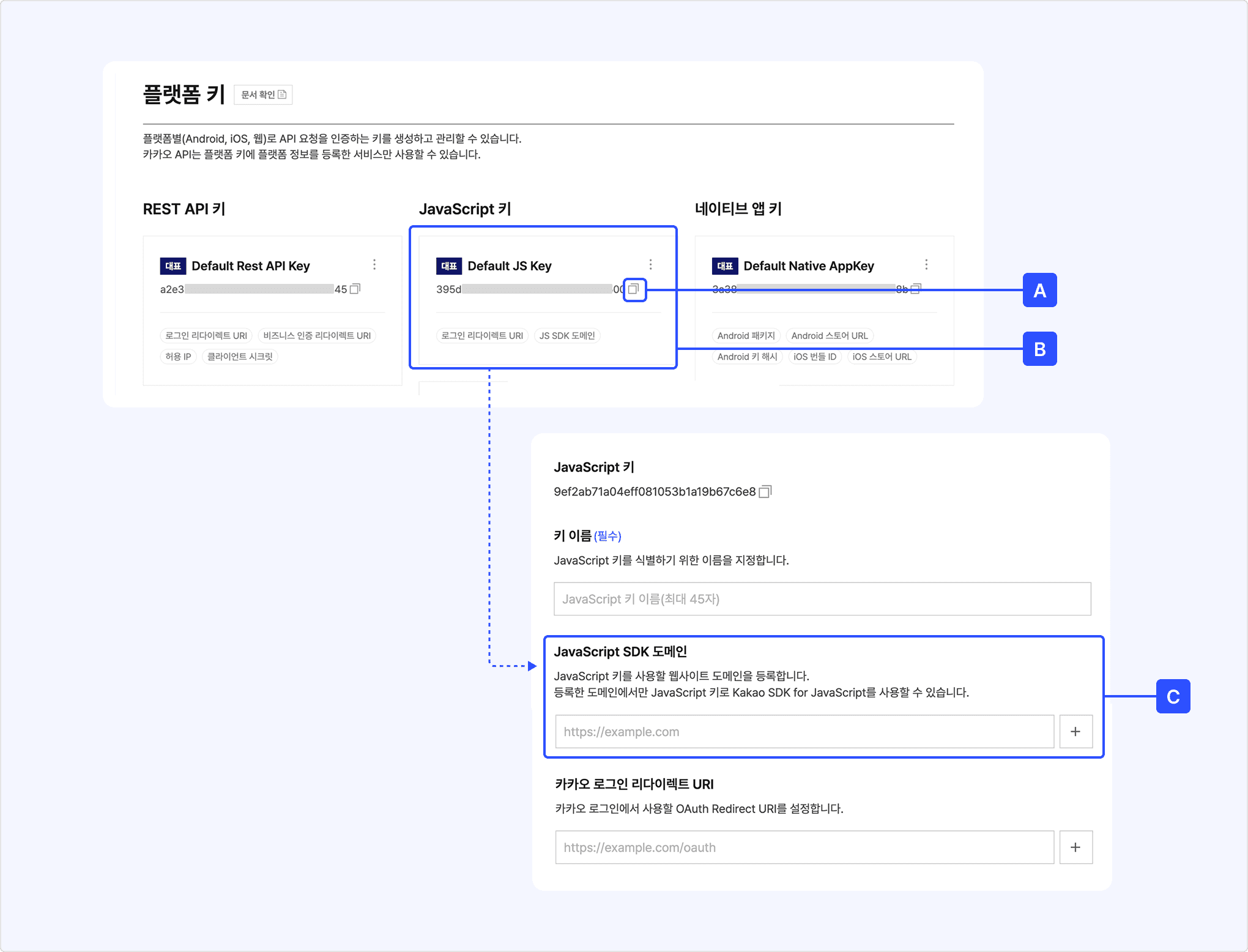
- Go to [App] > [Platform Key] > [JavaScript key].
- Select the [A] copy icon to the right of the JavaScript key value you want to use. You use the copied key in Implement Kakao Talk Share.
- Select the [B] JavaScript key, and register
http://localhost:4000as the [C] JavaScript SDK domain.- Important: When applying this feature to a real service, register the domain of the service webpage.
To use web links in Kakao Talk Share messages, register a web domain.
- On the app management page, go to [App] > [Product Link].
- Register the website domain to open from the message under Web domain. Register
https://developers.kakao.comto use the example template in this tutorial. - If necessary, select a Default web domain.
Create a project folder and an HTML file using a code editor or terminal.
- In Finder (macOS) or File Explorer (Windows), create a
kakao-sharefolder in the desired location. - Open the
kakao-sharefolder in a code editor. - Create an
index.htmlfile in the folder. - Copy the complete code provided in Step 4 into
index.htmland save the file.
Run the commands for your operating system.
Configure the message to share through Kakao Talk as a custom template in the Message Template Tool.
- See Send a custom message to yourself and create a Feed A template.
- Set [Purpose] to Kakao Talk Share API.
- Configure the image, title, description, and button.
- See Send a custom message to yourself > 3. Configure message components and configure the message template.
- Enter
Recommended for ${NAME}in the header to add a user argument. You can pass a desired value to the user argument when sharing the message in the next step. For details, see User arguments. - Save the template and check the template ID.
- Note: You can find the template ID in area [B] or [C] on the Message Template Settings screen.
Copy and paste the complete code below into index.html. This code installs and initializes the JavaScript SDK and implements a Kakao Talk Share button.
The code below uses JavaScript SDK 2.8.4. To use the latest version, select the [</>] button in Download JavaScript SDK, and copy and use the latest script code.
Run a local server in the folder containing index.html.
Keep the terminal running, and open http://localhost:4000 in a web browser.
If you registered an actual domain as the JavaScript SDK domain in 1-2. Set JavaScript key and domain, access the actual domain instead.
To test Kakao Talk Share, log in with a Kakao Account linked to Kakao Talk. You can check the logged-in account in Kakao Talk under [More] > [Settings] > [Kakao Account]. If you log in with a Kakao Account that is not linked to Kakao Talk, a 4012 error occurs. For details, see Kakao Talk Share error code.
- Select [Share via Kakao Talk].
- On a device with Kakao Talk installed, check that Kakao Talk launches.
- Select a friend or chatroom on the share target selection screen.
- Select [Share].
- Check that the custom template message appears in the selected chatroom.
- Select the link in the message and check that the registered webpage opens.
When you run the example in a PC web browser, the Kakao Account login screen may appear. When Kakao Talk Share is complete, the browser returns to the previous page.
This step explains how to apply the official Kakao Talk Share button image.
You can use Kakao.Share.createCustomButton() to connect the share function to the downloaded button. This function does not create a button on the screen. It connects a click action to the HTML element specified by container.
- On the Download design resources page, select [Small] as the button size under [Kakao Talk], and select [Download].
- From the downloaded compressed file, copy
kakaotalk_sharing_btn_small.pngto thekakao-sharefolder containingindex.html. - Replace the
<button>and<script>from Step 4 with the code below. - Replace
${JAVASCRIPT_KEY}and12345with the JavaScript key of your app and the custom template ID, respectively.
Use Kakao.Share.sendCustom() when your service directly requests sharing from a click event. Use Kakao.Share.createCustomButton() when the JavaScript SDK connects a click action to a specified element. For details about the differences, see Choose an implementation method.
| Problem | What to check |
|---|---|
Kakao is not defined error occurs. | Check the SDK script tag URL and loading order. |
| An unregistered domain error occurs. | Check whether the access URL is registered as a JavaScript SDK domain. |
| The template cannot be found. | Check templateId, the selected app, and whether the template is saved. |
${NAME} appears as-is in the message. | Check whether the NAME value is passed in templateArgs. |
| The message link does not open. | Check Register web domain and the component link settings in the template. |
For more information about the causes of errors, see Kakao Talk Share error code and FAQ.
- Test with sample code
- Implement Kakao Login
- Send a custom message to yourself
- Send Kakao Talk messages between service users