
This document describes how to integrate Kakao Login APIs into your service with JavaScript SDK v1 (also referred to as 'Legacy JavaScript SDK').
Legacy JavaScript SDK (v1) will no longer be supported as of December 31, 2026. Use the latest JavaScript SDK by downloading it, or upgrading from v1 to v2. For more details, see Notice.
For a Kakao Login button, you can download the resources provided by Kakao or customize buttons according to your service user interface by referring to the Design guide.
For services running on PC and mobile web, Legacy JavaScript SDK lets you implement Kakao Login while taking advantage of both client-side and server-side requests. When you use Simple Login of Legacy JavaScript SDK, users on mobile web can log in easily with Kakao Talk without entering their Kakao Account information. The following sequence diagram shows the Kakao Login process with Legacy JavaScript SDK. Refer to the step-by-step guide and REST API together.
Kakao Login process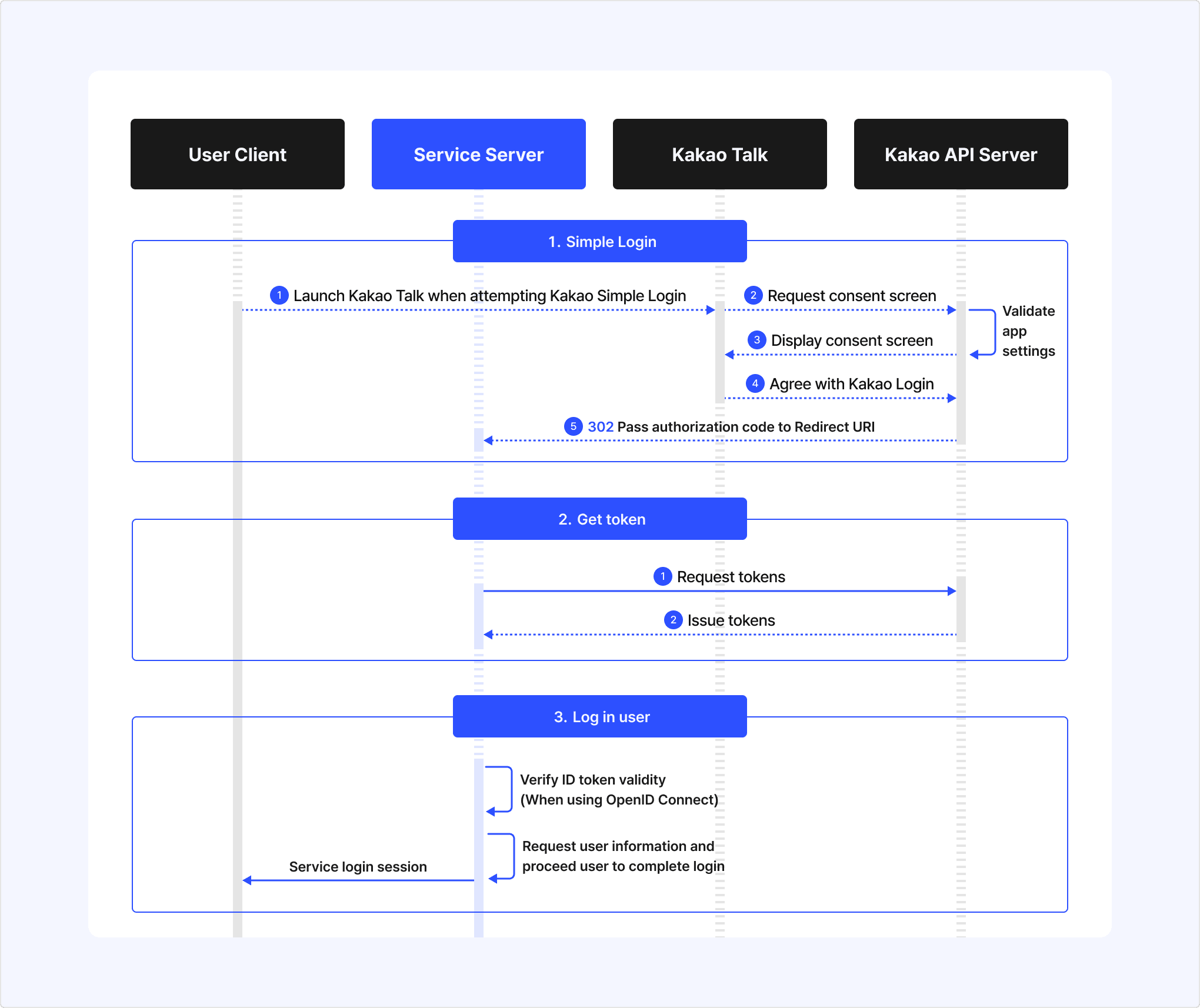
- When a user clicks the Kakao Login button on the service client, call the
Kakao.Auth.authorize()function to request the Simple Login API. - Kakao Talk requests the Consent screen from the Kakao Auth server.
- The Kakao Auth server presents the Consent screen to the user to request user consent for authorization.
- The Consent screen is composed according to the consent item settings of the service app.
- The user agrees to the required consent items and any other consent items they want, and then clicks the [Accept and Continue] button.
- The Kakao Auth server delivers the authorization code to the Redirect URI specified in the Simple Login request.
- The service server calls Get token with the authorization code received through the Redirect URI.
- The Kakao Auth server issues tokens and delivers them to the service server.
You must implement the user login process of your service on your own. This document provides information that you can refer to when implementing the user login process.
- The service server requests the Retrieve user information API with the issued access token to retrieve the user's service user ID and information, and then checks whether the user is a member of the service.
- The service client can also request the Retrieve user information API after setting the token.
- Based on the result of checking the service member information, log the user in to the service or sign the user up as a member.
- After performing any other login procedures required by the service, complete the service login process for the user who logged in with Kakao.
| Reference | App setting |
|---|---|
authorize() |
| Requirements | See also | |
|---|---|---|
The Simple Login functions to authenticate a user through Kakao Talk without inputting the Kakao Account information and get an authorization code.
For the Simple Login function, call the Kakao.Auth.authorize() function. If Kakao.Auth.authorize() is invoked by the click event handler, the Consent screen is presented. If a user consents to the provision of their personal information and the use of your service, the Kakao authorization server issues the authorization code to the Redirect URI of the service server with the HTTP response status code 302.
Afterthat, request the Get token API with the obtained authorization code to complete the login. To see how to set or check the Redirect URI, refer to Prerequisites > Set Redirect URI.
To see how to get an authorization code and tokens, refer to REST API.
When you call Kakao.Auth.authorize through JavaScript SDK v1, you must use your JavaScript key used to initialize the SDK. However, when you request the Get token API, use your REST API key.
The Kakao Login API functions to authenticate users on the Kakao platform and links their accounts with your app so that they can use your service. However, those who do not have Kakao Accounts need to create a new account in your service. In this case, you need to implement the process of creating a new account and updating the user information in your own service.
| Name | Type | Description | Required |
|---|---|---|---|
| redirectUri | String | A callback URL that the authorization code is redirected to. | O |
| state | String | If you add this parameter in the request, users are redirected to the page that they were viewing before authentication. If this parameter is included in the request, the same state parameter value with the request is sent to the response. | X |
| scope | String | List of consent item IDs to request user consent for Used to request additional consent. | X |
| throughTalk | Boolean | Whether to use the Simple Login function. (Default: true) | X |
| prompts | String | Used for additional interactions when requesting an authorization code.
| X |
| nonce | String | Random string to compare during ID token verification (no fixed format). Note: Used to prevent ID token replay attacks when issuing an ID token together through OpenID Connect. | X |
Call the Get token API with REST API from the service server using the authorization code to complete the login. If your app uses OpenID Connect, you can also get an ID token through the token request.
- There are three types of tokens: access token, refresh token, and ID token.
- An ID token is issued only when you use OpenID Connect.
- You can validate an access token with the Retrieve access token information API, and an ID token with Validate ID token.
Once Kakao Login is completed and the service server has the tokens issued, the service server can call the Retrieve user information API with the access token to request the user information required for signup and login. If you deliver the access token to the service client and set the token, the service client can also use it for Kakao API requests through Legacy JavaScript SDK.
When you call the Kakao.Auth.authorize function through Legacy JavaScript SDK, use the JavaScript key used to initialize the SDK. However, when you request the Get token API with REST API, you must use your REST API key.
| Reference | App setting |
|---|---|
setAccessToken() |
| Requirements | See also |
|---|---|
When the access token and refresh token are passed in your service server, you can use the tokens to call the Kakao APIs such as the Retrieve user information API with the issued tokens.
To call other Kakao APIs besides the Login API using the JavaScript SDK v1, you need to assign your tokens into SDK. Call the Kakao.Auth.setAccessToken() function with the access token passed in the login response to set it to use in the JavaScript SDK v1.
The additional features available when requesting the Simple Login API are as follows.
- Request additional consent
- Auto-login in Kakao Talk
- Get consent to desired service terms
- Login regardless of previous login status
This API prompts the Consent screen to request additional permission or specific personal information for the service if the user has not agreed once logging in with Kakao.
Before using this API, read Concepts > Request additional consent thoroughly for a better understanding.
Call the authorize() function that requests an authorization code with the scopes you want to request consent through the scope parameter.
Pass the scope IDs through the scope parameter. Refer to the Parameter of Simple Login for each parameter. The response is the same as the response of the Get authorization code API. If the request is successful, the Consent screen that includes the requested scope as a consent item is presented. When a user selects [Accept and Continue] on the Consent screen, the request is successfully completed. If the user selects [Cancel], the request fails.
The following example requests additional consent to email and gender through the OAuth protocol.
The following example requests the same consent through the OIDC protocol.
If your app uses OpenID Connect, you must include openid in the scope parameter that passes the consent item keys when requesting additional consent. If you do not include it, an ID token is not reissued. Refer to scope parameter of the Get authorization code API.
Auto-login in Kakao Talk is an additional feature that supports branching by whether the user has signed up for the service when the user enters a service page in the Kakao Talk in-app browser. Read Concepts thoroughly before using this feature. Set the prompts parameter to none when requesting Simple Login.
If the user has not completed the service signup and is not linked with the app yet, an error response indicating that user consent is required is delivered to redirect_uri as follows. In this case, the user must log in with Kakao and sign up for the service on the service page.
This API enables you to request consent to specific service terms that a user has not consented to, regardless of whether the user has already signed up.
This API is only allowed for the service that adopted Kakao Sync.
If your app is used for multiple services and each service requires consent to different terms, or if a new required term is added to your service, you can use this API. For more details, Design service terms and policies.
Pass serviceTerms to the authorize() method as a parameter. Make sure to include all tags of the service terms needed to get consent in a single String format by separating respective tags by comma(,).
If the request is successful, an authorization code is returned in the same way as REST API. If the Consent screen is not prompted even after calling this API, refer to FAQ.
Refer to the Parameter of Simple Login for each parameter.
If your service uses OpenID Connect and OpenID Connect usage setting is enabled, you can get an ID token together without passing any additional parameter. When you use OpenID Connect, we recommend using the nonce parameter to prevent ID token replay attacks. Note that you must include openid in the scope parameter to get an ID token reissued when you request additional consent. Refer to scope parameter of the Get authorization code API.
Login regardless of previous login status is an additional feature used when your service needs to authenticate the user again. With this feature, you can make the user log in with their Kakao Account again and then log in to the service with Kakao, even when the user is already logged in with their Kakao Account in the browser. Set the prompts parameter to login when requesting Simple Login.
| Reference | App setting |
|---|---|
logout() |
| Requirements | See also | |
|---|---|---|
The Logout API is used to let a user log out of the app.
After the user is logged out, you cannot call the Kakao APIs using the corresponding access token because it expires.
Call the Kakao.Auth.logout function in the click event handler invoked when a user clicks [Logout], and then the tokens issued during the login process expire. If the request is successful, implement the process of logging out of a service internally.
The Kakao.Auth.logout function makes the tokens expire, not make a user log out from your service or Kakao Account. Therefore, you need to implement the logout process internally in your service.
| Type | Description | Required |
|---|---|---|
Function() | Callback function that gets invoked when the token expires. | X |
| Reference | App setting |
|---|---|
request() |
| Requirements | See also | |
|---|---|---|
This API unlinks an app from a user's Kakao Account.
Call the Kakao.API.request function in the click event handler invoked when a user requests to unlink.
Call the Kakao.API.request() function, and set url to /v1/user/unlink.
You should implement the function of deleting a user's account in your service internally after unlinking the account from your app because the Kakao.API.request function does not affect the user data in the server.
| Name | Type | Description | Required |
|---|---|---|---|
| url | String | Fixed to /v1/user/unlink. | O |
| success | Function(Object) | Callback function that gets invoked when the API request is successful. | X |
| fail | Function(Object) | Callback function that gets invoked if the API request is failed. | X |
| always | Function(Object) | Callback function that gets invoked regardless of API request results. | X |
To get a notification when a user unlinks from a service in person, use the 'Unlink webhook' function. In the case of a user is unlinked through the Unlink API, the callback is not sent. Refer to Reference Information > Advanced > Unlink webhook for the implementation method and the callback request information.
| Reference | App setting |
|---|---|
request() |
| Requirements | See also | |
|---|---|---|
| ||
This API enables you to retrieve the Kakao Account information of a user who is logged into Kakao.
To retrieve user data, you must set consent items and obtain user's consent for the data that your service needs. If a user does not consent, you cannot get the user data. To check which scopes a user has already agreed, you can call the Retrieve consent details API and check the agreed scopes first.
You can request this API by calling a REST API with the kakao.API.request() function. Call the kakao.API.request() function, and set url to /v2/user/me. You can request a specific user information using the property_keys parameter. For the request information, refer to REST API.
The response includes user information and is same as the REST API. Refer to User information for more details.
| Name | Type | Description | Required |
|---|---|---|---|
| url | String | Fixed to /v2/user/me. | O |
| success | Function(Object) | Callback function that gets invoked when the API request is successful. | X |
| fail | Function(Object) | Callback function that gets invoked when the API request is failed. | X |
| always | Function(Object) | Callback function that gets invoked regardless of API request results. | X |
| data | Object | Object that contains the parameter to be passed when requesting the API. Refer to data: Retrieve user information for more details. | X |
| Name | Type | Description | Required |
|---|---|---|---|
| property_keys | String[] | Use this parameter to specify the scopes of user information to be requested in ["key1","key2"] format. | X |
| Reference | App setting |
|---|---|
request() |
| Requirements | See also | |
|---|---|---|
This API stores or update additional user information on the Kakao platform to use in a service, which is called 'User properties'.
You must use the property keys designated in [Kakao Login] > [Advanced] > [User Properties] on the app management page.
You can request this API by calling a REST API with the kakao.API.request() function. Call the Kakao.API.request() function, and set url to /v1/user/update_profile. You must pass the custom property keys and values that you want to update through properties in a key-value pair. For example, if you want to update a user's clothing size, set properties to clothing_size: 'small'.
If the request is successful, the service user ID requested to update information is returned in the same way as REST API. To check the updated user information, call the Retrieve user information API.
| Name | Type | Description | Required |
|---|---|---|---|
| url | String | Fixed to '/v1/user/update_profile'. | O |
| success | Function(Object) | Callback function that gets invoked when the API request is successful. | X |
| fail | Function(Object) | Callback function that gets invoked when the API request is failed. | X |
| always | Function(Object) | Callback function that gets invoked regardless of API request results. | X |
| data | Object | Object that contains the parameter to be passed when requesting the API. Refer to data: Store user information for more details. | O |
| Name | Type | Description | Required |
|---|---|---|---|
| properties | Object | User information that you want to update in {key:value} format. | O |
| Reference | App setting |
|---|---|
request() |
| Requirements | See also | |
|---|---|---|
| ||
This API enables you to retrieve shipping addresses saved in user's Kakao Account.
To retrieve shipping address,
- You must enable the 'Shipping information (shipping_address)' scope.
- Users must consent to the scope. If a user does not consent, you cannot get the user data even though you enabled the scope. If Kakao does not retain a user's shipping address, Kakao cannot provide the information to your service even when a user consents.
The shipping_address scope is inactivated by default. To set the scope to 'Optional consent', connect your app to a Biz Channel. If your service must get users' shipping addresses, set the scope to 'Required consent' by going through the Review for Provision of Personal Information provided by Kakao Sync and use the Provision after collecting information option.
Call the Kakao.API.request() function, and set url to /v1/user/shipping_address.
| Name | Type | Description | Required |
|---|---|---|---|
| url | String | Fixed to '/v1/user/shipping_address'. | O |
| success | Function(Object) | Callback function that gets invoked when the API request is successful. | X |
| fail | Function(Object) | Callback function that gets invoked when the API request is failed. | X |
| always | Function(Object) | Callback function that gets invoked regardless of API request results. | X |
| data | Object | Object that contains the parameter to be passed when requesting the API. Refer to data: Retrieve shipping address for more details. | X |
| Name | Type | Description | Required |
|---|---|---|---|
| address_id | Number | If there are multiple shipping addresses, specify an address ID to get a specific shipping address. | X |
| from_updated_at | Number | If multiple shipping addresses return through multiple pages, only the shipping addresses that are changed after the updated_at time return.The last shipping address on the previous page is used for an input value for the next page. If set to 0, shipping addresses are retrieved from the beginning. | X |
| page_size | Number | Number of (two or more) shipping addresses displayed on a page. (Default: 10) | X |
If the request is successful, the user's shipping addresses are returned. For the detailed response fields, refer to REST API > Retrieve shipping address for more details.
| Reference | App setting |
|---|---|
request() |
| Requirements | See also | |
|---|---|---|
| ||
This API enables you to retrieve the detailed information of the scopes (consent items) that a user has agreed to.
You can check all scopes set in [Kakao Login] > [Consent Items] on the app management page and the details of the scopes. If a user has consented to the scope before, the scope is included in the response even though your app is currently not using the scope.
Call the Kakao.API.request() function, and set url to /v2/user/scopes. You can also designate the scopes you want to check the details by specifying the scopes parameter. If the request is successful, the response includes only the detailed information of the specified scopes in the same way as the REST API. Refer to REST API > Retrieve consent details for more details.
| Name | Type | Description | Required |
|---|---|---|---|
| url | String | Fixed to /v2/user/scopes. | O |
| success | Function(Object) | Callback function that gets invoked when the API request is successful. | X |
| fail | Function(Object) | Callback function that gets invoked when the API request is failed. | X |
| always | Function(Object) | Callback function that gets invoked regardless of API request results. | X |
| data | Object | Object that contains the parameters to be passed when requesting the API. Refer to data: Retrieve consent details for more details. | X |
| Name | Type | Description | Required |
|---|---|---|---|
| scopes | String[] | List of scope IDs you want to retrieve. Used when you retrieve specific scopes only. You can figure out each scope's ID in [Kakao Login] > [Consent Items] on the app management page. (Example: ["account_email","gender"]) | X |
| Reference | App setting |
|---|---|
request() |
| Requirements | See also | |
|---|---|---|
| ||
This API revokes the scope that a user has agreed to.
You can only revoke the scope with "revocable":true among the scopes retrieved through the Retrieve consent details API. If you request to revoke the scope that is not revocable, an error is returned.
Call the Kakao.API.request() function, and set url to /v2/user/revoke/scopes. The response is the same as the response of Retrieve consent details API. Refer to REST API > Revoke consent details.
| Name | Type | Description | Required |
|---|---|---|---|
| url | String | Fixed to /v2/user/revoke/scopes. | O |
| success | Function(Object) | Callback function that gets invoked when the API request is successful. | X |
| fail | Function(Object) | Callback function that gets invoked when the API request is failed. | X |
| always | Function(Object) | Callback function that gets invoked regardless of API request results. | X |
| data | Object | Object that contains the parameters to be passed when requesting the API. Refer to data: Revoke consent for more details. | O |
| Name | Type | Description | Required |
|---|---|---|---|
| scopes | String[] | List of scope IDs you want to revoke. You can revoke only the scope with "revocable":true among the scopes retrieved through the Retrieve consent details API.You can figure out each scope's ID in [Kakao Login] > [Consent Items] on the app management page. (Example: ["account_email","gender"]) | O |
| Reference | App setting |
|---|---|
request() |
| Requirements | See also | |
|---|---|---|
This API enables you to check the service terms that a user has consented to.
This API is only allowed for the service that adopted Kakao Sync.
You can request this API by calling a REST API with the kakao.API.request() function. Call the kakao.API.request() function, and set url to /v1/user/service/terms.
| Name | Type | Description | Required |
|---|---|---|---|
| url | String | Fixed to /v1/user/service/terms. | O |
| success | Function(Object) | Callback function that gets invoked when the API request is successful. | X |
| fail | Function(Object) | Callback function that gets invoked when the API request is failed. | X |
| always | Function(Object) | Callback function that gets invoked regardless of API request results. | X |
| data | Object | Object that contains the parameter to be passed when requesting the API. Refer to data: Retrieve consent details for service terms for more details. | O |
| Name | Type | Description | Required |
|---|---|---|---|
| extra | String | Additional action to request Used to retrieve all of the terms registered in your app. In this case, set it to app_service_terms. | X |
| Reference | App setting |
|---|---|
login() |
| Requirements | See also | |
|---|---|---|
If you need to display the Consent screen as a pop-up window or if the whole authentication should be completed from the client-side, use the Kakao.Auth.login() function.
If you call this function in the click event handler, you can present the Kakao Login Consent screen and then get consent to providing user information and use of the service from users.
If the login request is successful, an access token is issued. Because the access token is used internally in the SDK, you do not need to process it separately. However, you need to process a login or signup process in your service for a user who succeeded in logging in using the callback function.
| Name | Type | Description | Required |
|---|---|---|---|
| success | Function(Object) | Callback function that gets invoked when the API request is successful. For the response, refer to the REST API > Get tokens. | X |
| fail | Function(Object) | Callback function that gets invoked when the API request is failed. | X |
| always | Function(Object) | Callback function that gets invoked regardless of API request results. | X |
| scope | String | List of consent item IDs to request user consent for Used to request additional consent. Pass the scope IDs of the User information. You can figure out each scope's ID in [Kakao Login] > [Consent Items] on the app management page. For multiple scopes, separate them by comma(,) as a string without space. (Example: 'account_email,gender')Important: If you implement OpenID Connect (OIDC), you must add openid to scope along with the scope values you want to obtain consent. If not, OAuth is enabled even though you enabled OIDC.(Example: scope: 'openid,account_email,gender') | X |
| persistAccessToken | Boolean | Stores the access token in the local storage to use it even after the session ends. (Default: true) | X |
| throughTalk | Boolean | Whether to use the Simple Login function. (Default: true) | X |
| nonce | String | Random string to compare during ID token verification (no fixed format). Note: Used to prevent ID token replay attacks when issuing an ID token together through OpenID Connect. | X |
This example shows how to add an event handler to the Kakao Login button using createLoginButton.
To enhance security, the JavaScript SDK v1 does not handle refresh token any more. The refresh token information ('refresh_token' and 'refresh_token_expires_in') issued through the Kakao.Auth.login and Kakao.Auth.createLoginButton function when logging in have been deprecated as of July 27, 2020. If your service is using a refresh token, you must request an authorization code using the Kakao.Auth.authorize function and get token using a REST API. Refer to Notice.
If you want to present the Consent screen as a pop-up window or the client handles all authentication processes, call Kakao.Auth.login().