
This document introduces the Kakao Talk Share API.
Kakao Talk Share is a feature that allows users to manually select content from a service and share it to a Kakao Talk chatroom. The content sharing feature using Kakao Talk Share can be utilized as a means for event promotion or user acquisition.
Kakao Talk Share Overview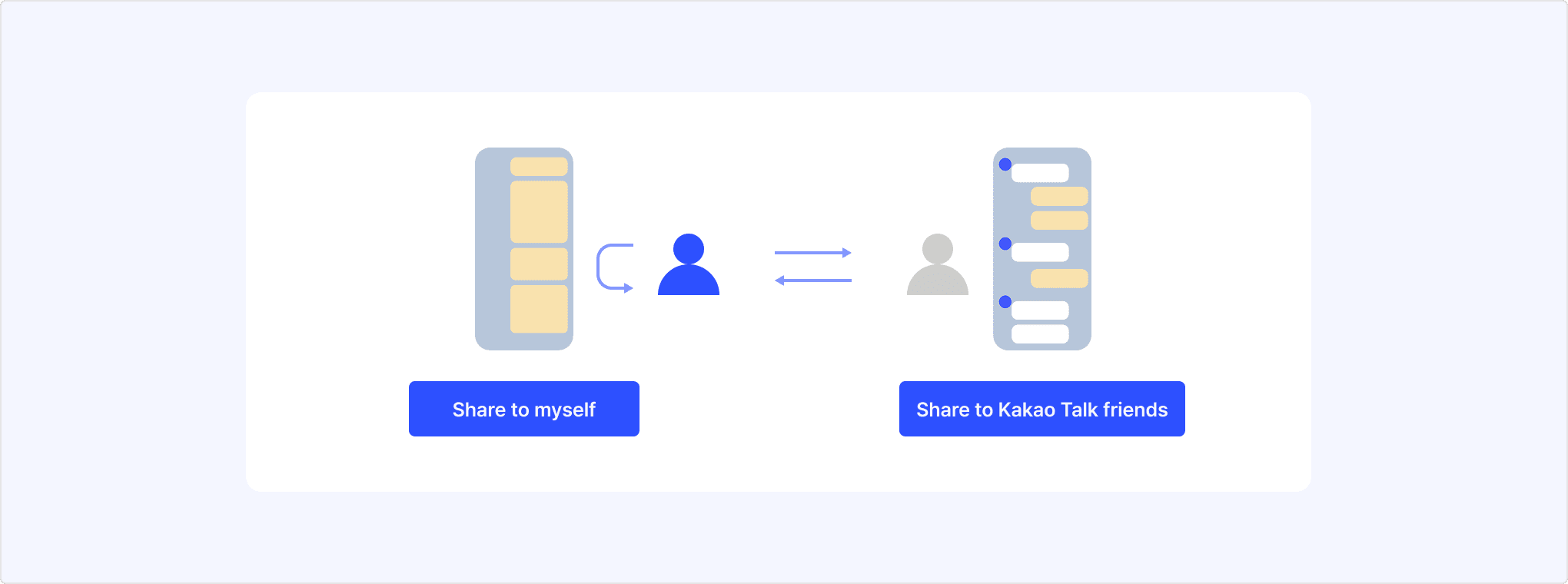
For the types and characteristics of various message sending features provided by Kakao, see Message sending features. For the differences between the message sending features provided by Kakao Developers, see Differences between Kakao Talk Share and Kakao Talk Message features.
Kakao Talk Share usage scenario example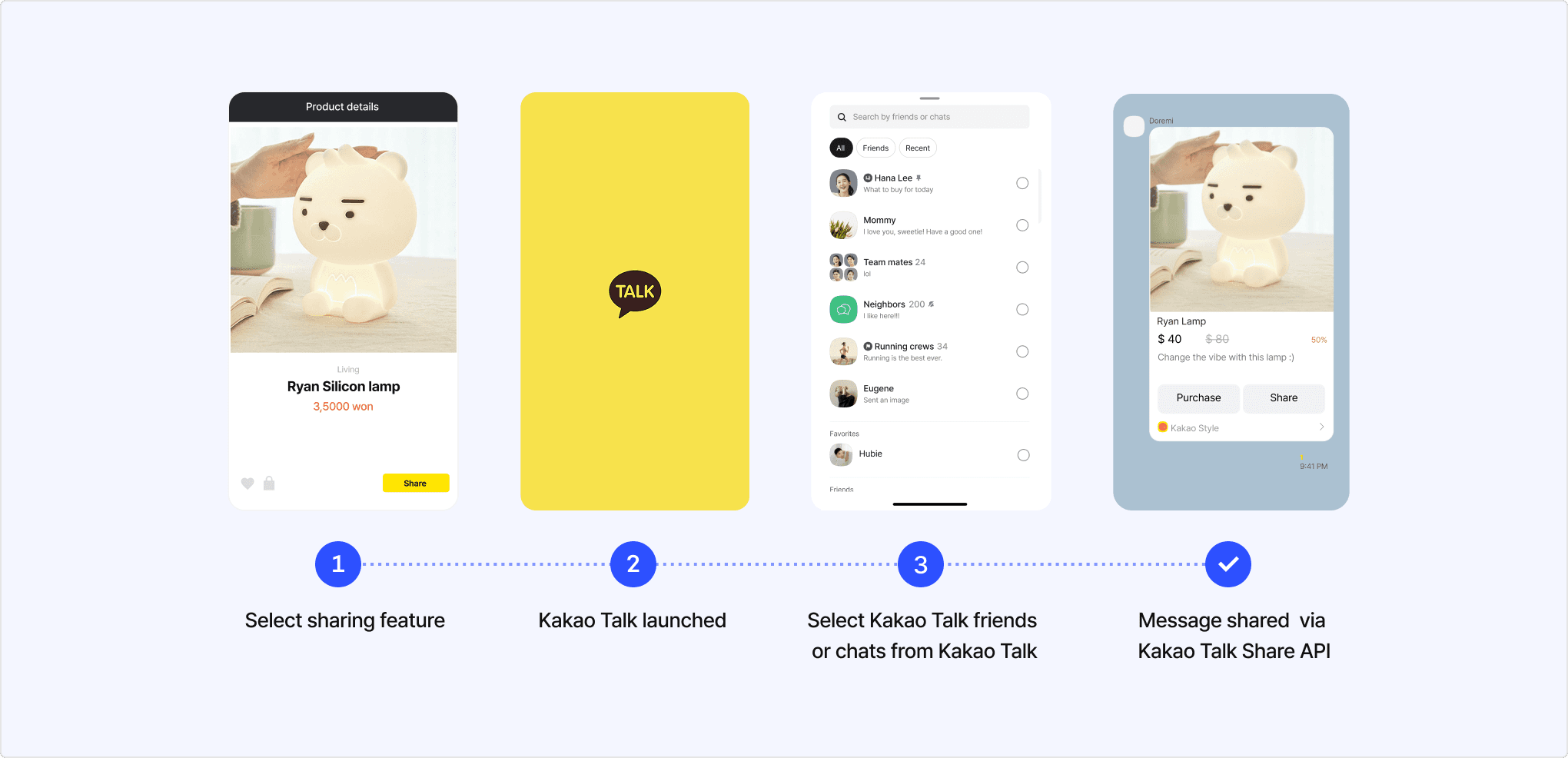
[3] For configuration of the Kakao Talk friend/chatroom selection screen, refer to Share target selection screen settings.
Kakao Talk Share is available through the Kakao SDK and does not support REST API. Follow the procedure below for usage.
- Create a developer account and a Kakao Developers app required to implement the Kakao Talk Share feature.
- Configure the message template to send via the Kakao Talk Share API. Use either default templates or custom templates.
- Implement the message sending feature by referring to the platform-specific development documentation. When implementing, refer to the Kakao Talk Share sending flow.
- Note: You can test API calls on the JS SDK demo page.
- If you need to use more than the free quota, you need to enable the paid usage.
This section explains the process of sending a Kakao Talk Share message from a service. Refer to the sequence diagram and the step-by-step explanation below.
Kakao Talk Share sending flow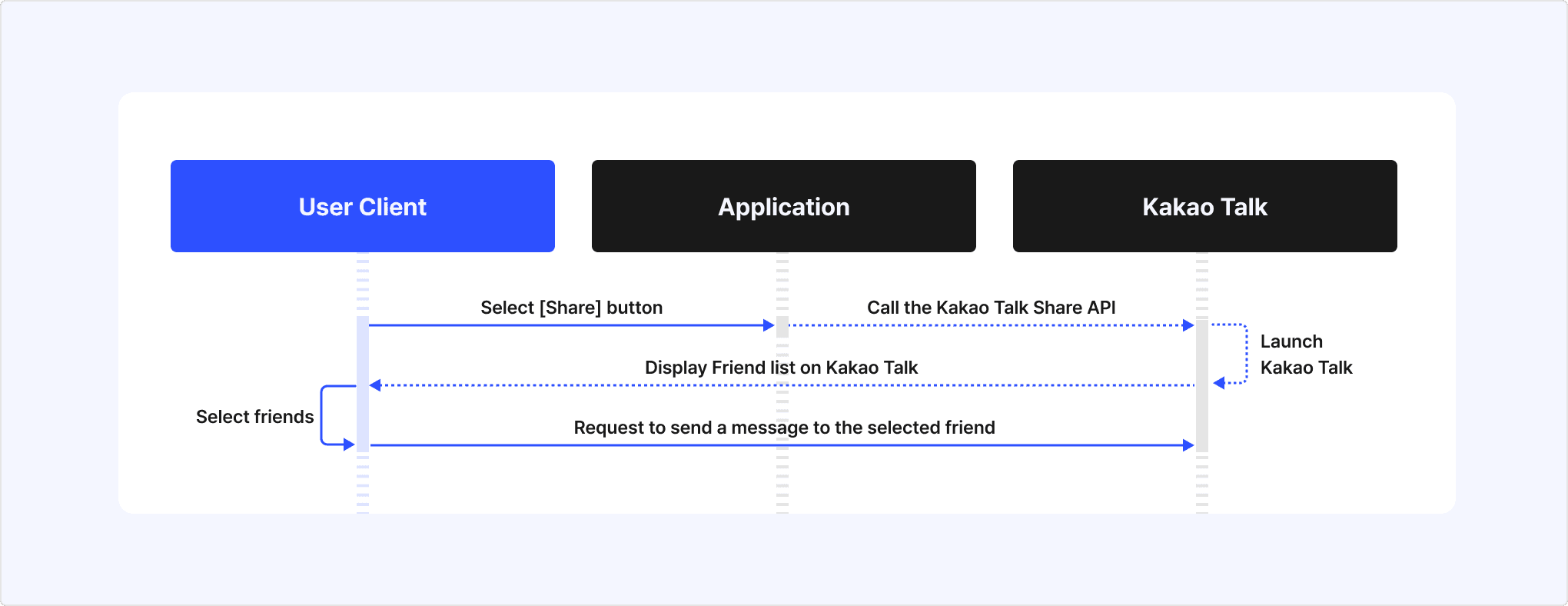
- When the user selects the Kakao Talk Share button on the service screen, the service calls the Kakao Talk Share API with the message composed using a message template as a parameter.
- Kakao Talk launches on the user's device, and the Kakao Talk friend (or chatroom) list is displayed.
- When the user selects the desired recipient from the Kakao Talk friend (or chatroom) list, the Kakao Talk Share message is sent.
This section introduces various Kakao Talk message sending features provided by Kakao. The differences between products can be found in the table below.
| Product | Description | Message sender → Recipient | Available platform |
|---|---|---|---|
| Kakao Talk Share | Users select content in the service and share it to Kakao Talk chatrooms themselves. Recommended use: Implementing content sharing features between users. | Kakao Talk user → User's Kakao Talk friends | Kakao Developers |
| Kakao Talk Message | Users send messages to their Kakao Talk friends who use the same service, for interaction purposes. Recommended use: Implementing message sending for user interactions. | Service's Kakao Login user → Service's Kakao Login user | Kakao Developers |
| Kakao Moment Personalized Message | Sends promotional personalized messages containing customer-specific data when customer behavior events occur. Can be configured in Moment Admin Center or using the Kakao Moment Personalized Message Management API. Recommended use: Sending targeted promotional messages via API. | Agency/Service → User | Kakao Developers, Kakao Business |
| Brand Message | Promotional messages sent through dealers to members who have consented to receive marketing. Recommended use: Sending bulk promotional messages. | Dealer/Service → User (Limited to members who have consented to receive marketing.) | Kakao Business |
| Kakao Talk Channel Message | Sends promotional or informational messages through Kakao Talk Channel. Recommended use: Sending promotional messages. | Service's Kakao Talk Channel → User | Kakao Business |
| Info Talk | The service sends informational messages to users. Recommended use: Sending informational messages to users. | Service's Kakao Talk Channel → User | Kakao Business |
| CS Talk | Users can open a Kakao Talk chatroom to make inquiries about the service. Recommended use: Implementing customer support using real-time chat or chatbot. | Service's Kakao Talk Channel (Only available after user initiates consultation) | Kakao Business |
Select the product that fits your service needs based on the guide below.
- If your service requires sending messages between users, choose the appropriate product between Kakao Talk Share and Kakao Talk Message.
- If your service needs to send messages directly to users, choose the appropriate product between Brand Message and Info Talk.
- If your service requires a customer support feature, select the CS Talk product.
For details on Brand Message, Info Talk, and CS Talk, see the Kakao Business document.
This section explains the differences between Kakao Talk Share and Kakao Talk Message, both of which are Kakao Talk Message sending features provided by Kakao Developers. Both features only support user-to-user messaging, and services cannot send messages directly to users.
Refer to the table below to check the feature differences and choose the product that best suits your service requirements.
| Item | Kakao Talk Share | Kakao Talk Message |
|---|---|---|
| Message recipients | All Kakao Talk friends of the user | Friends who meet the information provision conditions of the Retrieve friends list API. |
| Recipient selection UI | No separate implementation required. | Requires calling the Friend picker API or implementing a UI using the Retrieve friends list API. |
| Message sending method | When the user selects recipients in the Kakao Talk app, the sharing message is automatically sent. | After providing a recipient selection UI, the Kakao Talk Message API must be called with the selected recipients. |
| Permission required | X | O |
| REST API supported | X | O |
| Confirmation of message delivery success | Confirm via the Kakao Talk Share webhook. | Confirm via API response. |
Differences between Kakao Talk Share and Kakao Talk Message features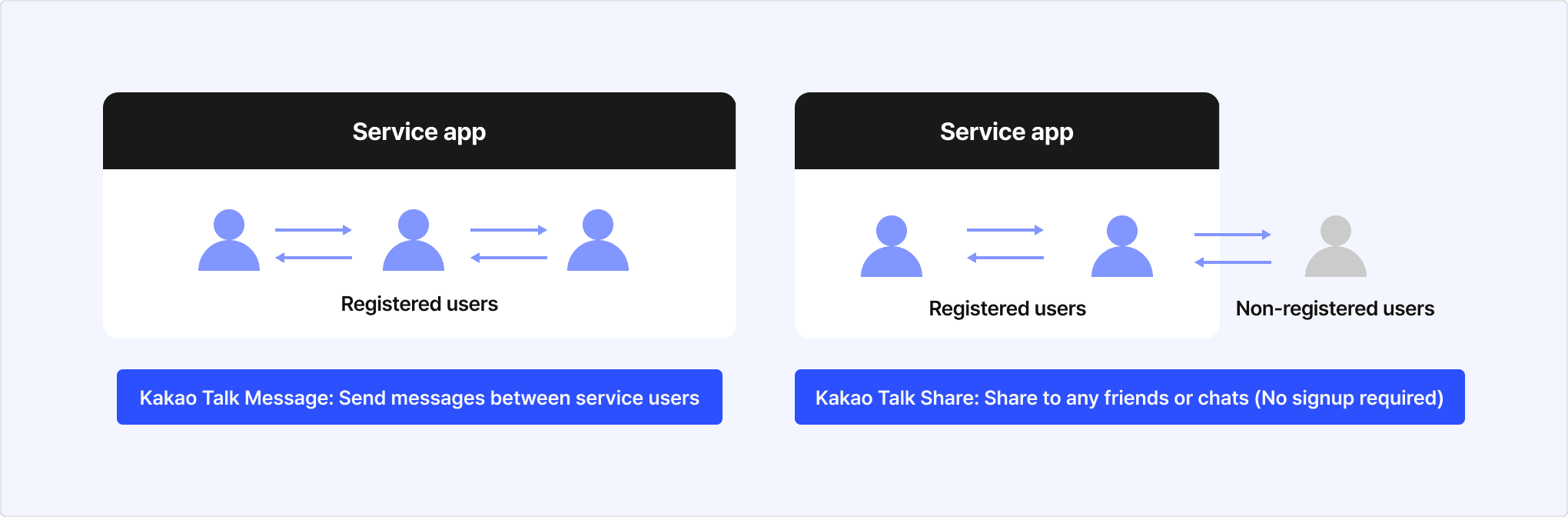
When sending Kakao Talk Share messages, you can use predefined default templates or custom templates that you configure using the message template tool. Refer to the respective documentation for usage instructions for each template type.
This section describes how to configure the display of the Kakao Talk Share target selection screen using parameters.
Calling the Kakao Talk Share API launches Kakao Talk and displays the share target selection screen. (See [3] in Message Sharing Scenario.)
By default, the share target selection screen displays both the Kakao Talk friends and the chatrooms.
To display only the friends list or only the chatroom list, use parameters.
This feature is available when all of the following conditions are met:
- JavaScript SDK 2.8.0 or higher (Android, iOS, and Flutter SDK support is planned for a future update.)
- Kakao Talk version 26.2.0 or higher (See Minimum supported version of Kakao Talk.)
To show only the friends list or only the chatroom list on the share target selection screen, your app is required to obtain permission to set the parameters.
- Set your app's name, icon, and company name to match your service details in the basic app information.
- Enter your business information and switch your app to a Biz app.
- Using the app's Owner account, post the following information on Kakao DevTalk or send a message to the DevTalk admin account (
@kakao):- App ID.
- Service description.
- Description of where and how Kakao Talk Share is used in your service.
- After receiving permission, include the relevant parameters when making API calls. See the developer documentation by platform for example code.
By default, when launching Kakao Talk for sharing, the list of both the friends and chatrooms appear as selectable targets. To display only friends or only chatrooms in the share target selection screen, use the parameters below.
Note: Setting these parameters requires permission. If you do not have permission, default values are applied.
| Name | Description |
|---|---|
pickerSettings.type | The type of list to display on the share target selection screen. Select
|
pickerSettings.limit | Maximum number of targets the user can select. Can be set from 1 to 10. (Default: 10)If pickerSettings.type is set to chat, the user can select up to 5 group chatrooms. |
- Send message with default template
- Send message with custom template
- Send scrape message
Kakao API applies monthly and daily quotas for stable service.
If your service requires more API calls than the default quota provided for events or promotions during a specific period, you can enable the paid usage to use as needed.
You can receive notifications when a user successfully sends a Kakao Talk Share message by using the Kakao Talk Share webhook. For instructions on how to configure the Kakao Talk Share webhook, see App > Kakao Talk Share webhook. For the developer guide, see Kakao Talk Share > Webhook.
If your service server's firewall blocks access from Kakao's scraping server, image transmission may be very slow or images may not be displayed. In this case, refer to Firewall to allow Kakao scraping server IPs in your ACL (Access Control List).
Kakao Talk Share only works properly if the user's device has Kakao Talk installed with a version that supports Kakao Talk Share or higher. The minimum Kakao Talk version required for using Kakao Talk Share by platform is as follows:
- Android: 10.0.0
- iOS: 10.0.0
The Share target selection screen settings require Kakao Talk version as below or higher:
- Android: 26.2.0 or higher
- iOS: 26.2.0 or higher
In mobile environments, if you want to share simple data such as files without using a message template, you can share it to Kakao Talk using the native sharing feature provided by each platform. For details, see the official documentation below.
- Android Sharesheet: Send simple data to other apps
- iOS Share Extension: Supporting suggestions in your app's share extension
Refer to Scope of support to know whether each Kakao SDK supports each feature.
| API | Reference | Description |
|---|---|---|
| Send message with default template | Kakao.Share.createDefaultButton()Kakao.Share.sendDefault() | Shares messages through Kakao Talk using predefined default templates. |
| Send message with custom template | Kakao.Share.createCustomButton()Kakao.Share.sendCustom | Shares messages through Kakao Talk using custom templates configured in [Tools] > [Message Template]. |
| Send scrape message | Kakao.Share.createScrapButton()Kakao.Share.sendScrap | Shares messages through Kakao Talk by configuring a scrap message with information from a specified web page. |
| Upload image | Kakao.Share.uploadImage()Kakao.Share.scrapImage()Kakao.Share.deleteImage() | Uploads image files to the Kakao server or scrapes image URLs. |